Table of contents
- The Need for MSP Ticketing Systems
- What Is an MSP Ticketing System?
- How MSP Ticketing Systems Work
- Why MSPs Need a Dedicated Ticketing System
- What Separates MSP-Grade Ticketing from Generic Help Desk Tools
- What to Look for
- How Syncro Makes MSP Ticketing Practical
- The Foundation of a Scalable MSP
- Frequently Asked Questions About MSP Ticketing Systems
TL;DR MSP ticketing systems centralize client IT requests, automate ticket routing, and track resolution times from a single platform. The best systems combine ticketing with RMM and PSA capabilities, reducing manual work while ensuring SLA compliance across multiple clients. Syncro’s Smart Ticket Management uses AI to classify tickets into 47+ categories and guide technicians to faster resolutions.
An MSP ticketing system helps you track user complaints, requests, and issues, boost your productivity, invoice clients, and much more.
In this blog post, we’ll answer some of the biggest questions about ticketing systems for MSPs. We’ll also look at the best MSP ticketing system and how to get started with it.
The Need for MSP Ticketing Systems
Most MSPs hit this inflection point somewhere between their 10th and 20th client. The volume of incoming requests, combined with SLA obligations across multiple contract tiers, creates operational debt that email threads and spreadsheets cannot carry. Technicians spend up to 40% of their day on ticket triage and administrative work that contributes nothing to resolution. SLAs get missed not because of bad technicians, but because there was no system to track them.
A dedicated MSP ticketing system solves this. Not by adding another tool to your stack, but by replacing the chaos with structure that scales. An MSP ticketing system is software that converts every client request into a trackable ticket with priority, SLA deadline, assigned technician, and time logged, built for multi-tenant environments where a single team supports dozens of organizations simultaneously. Unlike generic help desk tools, MSP ticketing systems integrate with RMM monitoring, time-tracking, and PSA billing to create a closed loop from alert to invoice.
Key Takeaways:
- Technicians spending up to 40% of their day on ticket triage is a tooling problem, not a staffing problem
- MSP ticket volumes have grown over 40% annually, while technician headcount has not kept pace
- 67% of MSP tickets are repetitive, low-value tasks that automation can handle
- MSPs using automation reduce ticket volume by 30-40% without adding headcount
- Multi-client architecture, RMM integration, and automated SLA tracking are non-negotiable for MSPs above 10 clients
What Is an MSP Ticketing System?
An MSP ticketing system is software that converts every client IT request into a structured ticket containing the requester’s details, issue description, priority level, and resolution history. It operates across multiple client accounts simultaneously, keeping data isolated between organizations while giving technicians a unified view of all active work.
The core difference between an MSP ticketing system and a generic help desk is multi-tenancy and integration depth. Generic help desk software handles a single organization’s support requests. MSP ticketing systems manage dozens of organizations with distinct SLA policies, branding, contact structures, and billing arrangements, all from one interface.
They also integrate directly with RMM monitoring and PSA billing. When a monitoring alert fires, the ticketing system creates a ticket automatically. When the ticket closes, logged time syncs to the invoice. That integration loop is what separates MSP-grade ticketing from a rebranded issue tracker.
How MSP Ticketing Systems Work
Understanding the full ticket lifecycle helps MSPs choose systems that match their actual workflow.
Ticket Creation
Tickets enter the system through multiple channels. Clients submit via web portals, email-to-ticket conversion, phone calls logged manually, or chat messages. RMM tools create tickets automatically when monitoring detects issues, such as a failed backup, offline endpoint, or disk space below threshold, without waiting for a client to report the problem.
Classification and Routing
Once created, tickets are categorized by type, urgency, and impact. Basic systems use dropdown menus. More advanced platforms analyze ticket content to classify requests automatically and route them based on technician skills, current workload, client tier, and SLA deadline. A platinum client with a 30-minute response SLA gets different routing priority than a standard client with a 4-hour window.
Work, Communication, and Resolution
Technicians work assigned tickets, add internal notes visible only to the MSP team, and post public updates that clients see. Time tracking runs automatically or manually. When the issue resolves, the technician logs a solution summary. The system sends an automated satisfaction survey. Closed tickets remain searchable so future technicians can reference past resolutions without starting from scratch.
Reporting and Billing
Every closed ticket generates data. Response time, resolution time, time logged, and technician assigned feed into reports for capacity planning, QBR prep, and invoicing. For MSPs on time-and-materials contracts, this is where billing accuracy lives. For fixed-fee clients, it reveals which accounts are overconsuming support.
Why MSPs Need a Dedicated Ticketing System
Email threads work fine at five clients. They break at fifteen. Here is what fails without a proper system.
Requests get lost. Without a ticketing system, a client email lands in one technician’s inbox, that technician is out sick, and no one else knows the request exists. Three days later, the client calls asking why nothing happened. A ticketing system converts every request into a record that survives personnel availability.
SLA compliance becomes impossible to manage manually. An MSP managing 20 clients with tiered SLAs across hundreds of concurrent tickets cannot track deadlines on a spreadsheet. Missed SLAs breach contracts, damage trust, and over time, lose accounts.
Billing is inaccurate. Memory-based time estimates introduce errors that accumulate across hundreds of tickets. Technicians underestimate hours on complex issues and round up on simple ones. For time-and-materials contracts, that erodes margin on both ends.
Institutional knowledge walks out the door. A technician troubleshoots a persistent network issue for four hours, documents it in a personal note, and leaves the company. The next time the same client has the same issue, the replacement technician starts from scratch. Ticketing systems store resolution history against the client and device record.
QBR data does not exist. Clients ask what they are getting for their monthly retainer. Without ticketing data, the answer is anecdotes. With it, the answer is: 47 tickets resolved, 98% SLA compliance, average 22-minute response time, three critical issues detected proactively before user impact.
What Separates MSP-Grade Ticketing from Generic Help Desk Tools
Most help desk tools were built for internal IT departments managing a single organization. MSPs running them adapt workarounds that do not scale. The differences matter operationally.
| Capability | Generic Help Desk | MSP Ticketing System |
|---|---|---|
| Multi-client support | Workarounds required | Native multi-tenant architecture |
| RMM integration | API only, if available | Native or built-in |
| SLA management | Single-tier policies | Per-client, per-priority SLA rules |
| Time tracking | Basic or none | Built-in, invoice-integrated |
| Billing integration | None | PSA-connected |
| Auto-ticket from monitoring | Not available | Standard feature |
| Client portal | Single-org branding | Branded per client |
| QBR-grade reporting | Ticket volume only | Multi-client performance reports |
When MSPs run generic help desk tools, they add manual steps to compensate for each missing capability in that table. Each manual step is a point of failure.
What to Look for
Not all MSP ticketing platforms are built the same. Evaluating them against these criteria narrows the field quickly.
Multi-Client Architecture
Each client’s data must be isolated. The system needs separate queues, custom SLA rules per client, and distinct branding for client-facing portals. If you are adapting a single-org tool to manage multiple clients, the workarounds will accumulate as you grow.
RMM Integration
Monitoring alerts should create tickets automatically. When a server goes offline at 2 AM, the system should generate a critical ticket and notify the on-call engineer before the client knows anything is wrong. The tighter the integration between monitoring and ticketing, the fewer manual steps between detection and response.
Automation Capabilities
Look for automatic ticket routing based on issue type, client tier, or technician availability. Automated client notifications when tickets are received, when work begins, and when issues resolve reduce manual communication overhead. SLA alerts should fire before deadlines are missed, not after.
Time Tracking and Billing
Built-in timers that capture exact work duration eliminate estimation errors. For MSPs billing by the hour, precision in time tracking directly affects margin. The time data should flow directly into invoicing without manual export or reconciliation.
Reporting Depth
Reports should cover ticket volume trends, technician utilization, SLA compliance by client, recurring issue patterns, and first-call resolution rates. If you cannot generate a QBR-ready report from your ticketing data in under five minutes, the platform is not doing its job.
Mobile Access
Technicians work on-site, in transit, and after hours. Mobile apps need full ticketing functionality. If a technician cannot manage their full queue from a phone, you are adding a gap to your support workflow.
How Syncro Makes MSP Ticketing Practical
Syncro combines PSA ticketing, RMM monitoring, and Microsoft 365 management in a single platform built for MSPs. The integration is not configured via API. The functions share a single database. When a monitoring alert fires, it creates a ticket with full device context already attached. The technician does not reconcile two systems. They work one ticket in one interface.
Specific capabilities relevant to MSP ticketing:
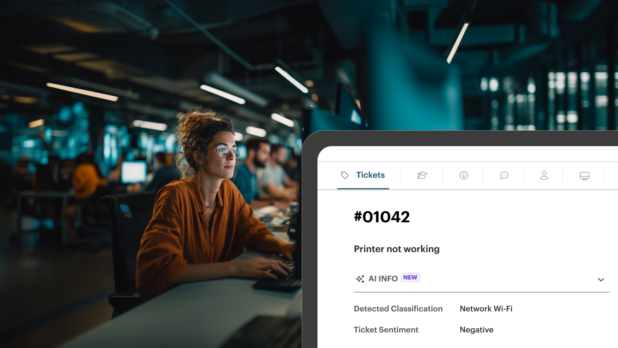
- Smart Ticket Management uses AI to classify incoming tickets into 47+ predefined categories, analyze content to identify issue type, and surface relevant solutions from your knowledge base. Guided resolution walks technicians through standard processes based on ticket classification, which accelerates resolution and reduces escalations.
- Automated ticket creation from RMM alerts means proactive issues enter the queue before clients report them. Device context, recent alert history, and asset details travel with the ticket.
- Per-client SLA policies enforce response and resolution deadlines by contract tier. Alerts fire before breaches, not after.
- Built-in time tracking captures exact duration per ticket, synced to invoicing so billing reflects actual work performed.
- Unlimited endpoint management means adding more clients to monitoring does not increase per-device costs. Per-technician pricing rewards scale rather than penalizing it.
Syncro charges per technician with unlimited endpoints. The more endpoints your team monitors proactively, the better your unit economics become as client count grows.
The Foundation of a Scalable MSP
The MSPs that grow predictably are not the ones that respond to tickets fastest. They are the ones with systems that prevent unnecessary tickets, track the ones that do come in, and produce the data needed to prove value at every client review. A dedicated ticketing system, integrated with RMM and PSA, is the operational foundation that makes all of that possible.
Join more than 4,000 MSPs building profitable businesses with Syncro. Start a free trial (14 days, full Team plan access, no credit card required).
Frequently Asked Questions About MSP Ticketing Systems
An MSP ticketing system is software that converts client IT requests into trackable tickets with priority levels, SLA deadlines, assigned technicians, and logged time. Unlike generic help desk tools, MSP ticketing systems are built for multi-tenant environments where a single team supports dozens of client organizations simultaneously, with native integration into RMM monitoring and PSA billing.
Generic help desks are built for single organizations. MSP ticketing systems support multiple client accounts with isolated data, per-client SLA policies, branded portals, RMM alert integration, and billing-connected time tracking. Using a generic help desk for MSP operations requires workarounds that break as client count grows.
Multi-client architecture, RMM integration, automated SLA tracking, built-in time tracking connected to billing, mobile access, and QBR-grade reporting. Prioritize platforms where ticketing and monitoring share a single database rather than connecting through external APIs that require ongoing maintenance.
By automatically tracking every ticket against its SLA deadline and alerting dispatchers before breaches occur. Per-client SLA rules enforce different response windows for different contract tiers. Reporting shows compliance rates by client so you identify recurring problem patterns before they become contract violations.
Yes. MSPs using automation reduce ticket volume by 30-40% by handling repetitive requests like password resets, standard software deployments, and routine maintenance tasks automatically. Proactive monitoring also reduces inbound tickets because issues are detected and resolved before users experience them.
Smart Ticket Management uses AI to automatically classify incoming tickets, identify issue type from the ticket content, and surface relevant solutions or guided resolution steps. Instead of a technician manually reading and categorizing each ticket, the system handles classification and routing automatically based on historical patterns and predefined categories.
RMM monitoring detects conditions like offline devices, failed services, or disk space thresholds and automatically creates tickets in the PSA with full device context attached. This creates a proactive ticket queue from monitoring events rather than waiting for clients to report problems. The tighter the integration, the less manual coordination between detection and response.
Measure current technician hours lost to manual triage, ticket routing, time entry, and client communication overhead. Compare against the platform cost after automation reduces that overhead by 30-40%. Add the value of avoided SLA breach penalties and improved client retention from consistent QBR reporting.

Share
Related Resources