Table of contents
- TL;DR
- The Call That Looks Like Your Help Desk
- Why This Episode, and Why Andy
- Cybercrime Now Runs Like a Business
- When the Attacker Uses Your Remote Tools
- Block Device Code Flow, Then See Who Complains
- Passkeys Are Where Small Businesses Have the Edge
- What the Report Leaves Out: The Network
- Using AI on the Defender’s Side
- The First Five: Day One at a 50-Seat Company
- What to Do Monday
- The Basics Got Faster
- Frequently Asked Questions
- Lock Down Every Client Tenant with Syncro
- Listen and Get Involved
TL;DR
- Attackers move in hours now. The median vulnerability is now weaponized less than a day after it’s found in the wild, and phishing jumped from 7% to 23% of initial access in Microsoft’s incident response cases. A monthly patch window is too slow, so put Windows and third-party apps on an automated patch schedule.
- Ransomware crews run like businesses. Ransomware detonations against enterprises are up 15.8%, and an unsanctioned remote monitoring and management (RMM) agent is now one of the most reliable signs of a hands-on intrusion. Alert on any remote tool you didn’t deploy, and decide before an incident whether a client would pay. The #StopRansomware Guide includes a ransomware response checklist you can build that runbook on.
- Your remote tool is the bait. Teams vishing calls from outside the organization are up 502%, and the goal is to get a user to install remote support software. Pick one sanctioned tool, block the rest, and close the Teams entry point with Center for Internet Security (CIS) Microsoft 365 Foundations recommendations 8.2.2, 8.2.3, and 8.5.7: disable communication with unmanaged Teams users, stop external Teams users from starting conversations, and block external participants from giving or requesting control.
- Verify both ways. About five seconds of audio is enough to clone a voice, so a caller’s voice proves nothing. Move sensitive requests to video and give clients a set process for confirming they’re talking to their real technician.
- Turn off device code flow. It hands an attacker a signed-in session with no password and no multifactor authentication (MFA) prompt. Block it with Conditional Access and exempt only the devices that need it, per CIS Microsoft 365 Foundations recommendation 5.2.2.12.
- Start passkeys with admins. Andy Jaw of Zscaler argues small businesses can move to phishing-resistant MFA faster than enterprises because they have fewer silos. Expect gaps with older on-premises systems and hardware, and put admins first, per CIS Microsoft 365 Foundations recommendation 5.2.2.5.
- Lock down the edge. List every internet-facing service for each client, close what isn’t needed, and patch virtual private network (VPN) appliances and firewalls as urgently as endpoints, using the Cybersecurity and Infrastructure Security Agency’s (CISA) edge device guidance.
The Call That Looks Like Your Help Desk
An employee gets a Microsoft Teams call from someone outside the company. The display name looks like an ordinary coworker’s name, not “Help Desk.” The caller says there’s a problem with the account and walks the employee through installing a remote support tool to fix it.
No malware, no stolen password. The employee said yes to software that looks exactly like what their managed service provider (MSP) uses every day. Microsoft says once that tool is on the machine, attackers finish looking around in two minutes or less.
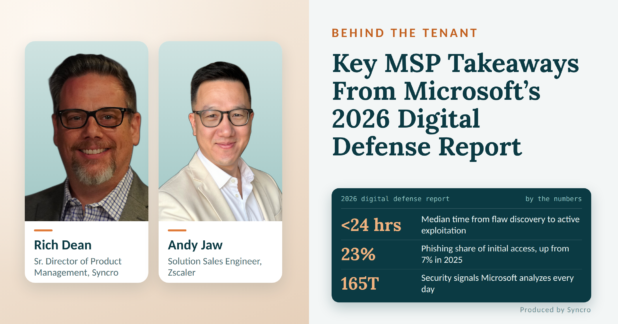
Microsoft’s 2026 Digital Defense Report (MDDR) says the weekly volume of confirmed malicious Teams voice phishing (vishing) calls from outside the organization is up 502% from a year ago. That number is why I wanted to spend a full episode of Behind the Tenant on the MDDR. The question I care about is simple: what in it should an MSP actually do something about?
Why This Episode, and Why Andy
Microsoft published the report on October 1. It runs just over 100 pages, it’s a free PDF download, and Microsoft builds it from more than 165 trillion security signals a day. Episode 1 with Merill Fernando quoted it while covering Maester 3.0. This episode goes through the MDDR itself and pulls out what MSPs should act on.
Andy Jaw has seen security from several angles. He served 10 years in the military and three years in law enforcement, then spent six and a half years at Microsoft as a Senior Security Solution Engineer, supporting manufacturing and federal customers, including the U.S. Air Force. Today he’s a solution sales engineer at Zscaler and co-hosts the weekly Blue Security Podcast with Adam Brewer. Zscaler sells security products and competes with Microsoft in places, so he reads the report from both sides of the fence.
Cybercrime Now Runs Like a Business
An MSP doesn’t need to keep the cybercrime economy top of mind every day, but they should know what motivates the attackers powering it. Unsurprisingly, it’s almost always money.
Modern cybercrime is an ecosystem, not a lone actor. One group steals credentials. Access brokers sell that foothold. Ransomware affiliates and malware developers take it from there. The report describes the same ecosystem and says these criminal economies have lowered barriers to entry, with artificial intelligence (AI) likely to compound the trend. Some crews even run customer service, with a phone number and a crypto wallet ready so victims can pay quickly. As I put it on the show, good service at the end is a sales play: victims pay faster when they believe they’ll get their data back.
Two details from the report matter most for MSPs:
- An unsanctioned RMM agent is now one of the most reliable mid-stage signs of a human-operated intrusion. Attackers use the same category of tools you do.
- Ransom detonations against enterprises are up 15.8% year over year, per Microsoft Defender. Akira was the most active ransomware in those enterprise attacks, at 22%.
The practical step is to decide before an incident whether a client would pay. That means a runbook that covers cyber insurance, who makes the call, and how payment would even work. Microsoft strongly discourages paying ransoms, but warns that blanket payment bans risk revictimizing organizations and suppressing reporting. Every minute spent figuring this out mid-incident is a minute the business is down.
When the Attacker Uses Your Remote Tools
The Teams vishing attack ends with the user installing remote access software. So how does a technician tell their own remote session from an attacker’s? The answer starts with lockdown and ends with process.
Lock down the entry point. Restrict who outside the organization can contact users in Teams, and tag external senders in email. If a client licenses Microsoft Remote Help for Intune, Conditional Access can require MFA or a compliant device for the technicians using it.
Standardize on one remote tool. Deploy a company-provided remote access tool through device management, tell users it’s the only one IT will ever use, and block everything else. Microsoft’s own guidance is to restrict remote management tools to authorized roles. On Windows, App Control for Business in Intune runs only the apps you approve, so an unapproved remote tool won’t launch even if a user downloads it. CISA’s Guide to Securing Remote Access Software covers the rest: application control, network blocks on unapproved tools, and alerting when one shows up.
Verify the person, both ways. About five seconds of audio is enough to clone a voice. For instance, Andy and Adam tested it by having a clone of Andy’s voice read the Declaration of Independence, and they said the result was “crazy scary accurate.” In short, a voice on the phone isn’t proof. Move sensitive requests to video, ask the person to hold up an ID, and have a set process everyone knows.
Verification is now a two-way street. The client needs to confirm they’re talking to their real technician, just as the technician confirms the client. That takes training. Even when people click through annual security training as fast as they can, some of it sticks.
Block Device Code Flow, Then See Who Complains
Device code flow lets you sign in on a device that has no good way to type, like signing in to Netflix on a smart TV by entering a code on your phone. It works unless you block it, and the MDDR says device code phishing has gone from niche to a preferred credential theft method for both nation-state and financially motivated attackers. Lures come as phishing links and QR codes.
The danger is that it looks normal. The attacker is using a legitimate authentication method, so nothing flags it as malicious. There’s no malware, no password typed, and no MFA prompt. Once the victim completes the flow, the attacker holds an authenticated session with whatever access that person has.
Adam’s advice on Blue Security’s MDDR episode was to turn it off and see who complains. I asked Andy whether that holds up for a 25-person dental office. His answer was yes, and Microsoft’s own guidance agrees: block device code flow wherever possible.
- Create a Conditional Access policy that blocks device code flow.
- Add an exception group for the accounts that need it. Microsoft calls out Teams Rooms and Teams Android devices, which use it to sign in and reauthenticate. Run the policy in report-only mode first.
- When someone complains they can’t sign in to Teams on a TV they bought, ask for the business case. If there is one, add the device to the exception group.
If you don’t know what you have, just block it.
Passkeys Are Where Small Businesses Have the Edge
Identity is still the main way in. In Microsoft’s incident response cases, phishing grew from 7% of initial access in 2025 to 23% in 2026, and attackers increasingly steal the signed-in session instead of the password. Adversary-in-the-middle phishing, which captures the session cookie to get around MFA, now makes up 44.6% of identified phishing techniques. Text-message codes don’t stop that. Phishing-resistant methods like passkeys and Fast Identity Online 2 (FIDO2) security keys do, because they only work on the real site.
When Andy joined Zscaler, the first thing in the box with his laptop was a physical FIDO2 key. He thinks small and midsize businesses can make this move faster than large enterprises, because they have fewer processes and silos to work through.
It isn’t painless, though. Passwordless sign-in still has friction across devices, and it isn’t supported everywhere. On-premises systems that check a password directly, like older line-of-business apps, legacy VPNs, and servers that still use basic authentication, usually can’t take a passkey at all. Hardware matters too. Windows Hello for Business works best on PCs with a Trusted Platform Module (TPM) 2.0 chip, and passkeys in Microsoft Authenticator need a reasonably current phone, so older devices may need replacing or a FIDO2 security key first. Those gaps are a big reason adoption has been slower than vendors hoped. For an MSP, a sensible start is admins and high-risk users first, then everyone else. Microsoft’s phishing-resistant passwordless deployment guide walks through that rollout, from prerequisites to planning by user type.
What the Report Leaves Out: The Network
From where Andy sits at Zscaler, the biggest difference is networking. Microsoft focuses on identity and application access, and the MDDR gives less weight to network architecture.
His case against the traditional setup: a VPN needs an internet-facing firewall with an open port, and once a VPN user’s identity is compromised, the attacker is on the network and can move laterally. The alternative is to treat every network as untrusted, the way you’d treat coffee-shop Wi-Fi, and broker each connection to each app separately. The industry term is secure access service edge (SASE).
Every network you touch should be treated as untrusted. Attackers lean on identity because it’s easier, but that doesn’t make the network a safe place to stop paying attention.
Where an MSP should start. Most small clients won’t move to SASE this year, but every one of them has an edge to lock down. List every internet-facing service for each client: VPN, Remote Desktop Protocol (RDP), firewall admin pages, and old port forwards. Close what isn’t needed. Patch VPN appliances and firewalls on the same urgent schedule as endpoints, because they sit directly on the internet and attackers go after them first. CISA and partner agencies published guidance for protecting network edge devices for exactly this reason. Require phishing-resistant MFA on any VPN that stays.
When a client is ready for the next step, Microsoft Entra Private Access brings the same app-by-app model into the Microsoft stack. It’s a paid add-on on top of Entra ID P1, which Business Premium already includes, so treat it as an upgrade conversation rather than a default.
Using AI on the Defender’s Side
The report’s starkest number is time. The median time from a vulnerability discovery in the wild to weaponization is now well below 24 hours, and the MDDR projects a record of about 72,000 Common Vulnerabilities and Exposures (CVEs) in 2026. The response starts with the oldest advice in security: “You can’t defend what you don’t know exists.”
He sees three practical uses for AI today:
- Make sense of discovery. A network scan can return thousands of devices. AI can sort and categorize that export into a usable asset list, then help plan what to patch first.
- Patch and rotate faster. If attackers move in a day, patching can’t wait for a monthly window. The same goes for rotating keys and secrets, especially as more people build tools with AI coding assistants.
- Read the logs. Andy runs Graylog Open, a free, self-managed log platform, in his home lab with his firewalls and servers feeding it. He connected it to Claude through an Model Context Protocol (MCP) server and asks what’s important each day. It flagged a crashed domain controller and helped him work out what to check. A small business could set up the same thing.
Trusting the output takes three habits: healthy skepticism, specific prompts, and a defined data set to work from. Prompting works like asking a genie for a wish, and a vague request gets you something you didn’t expect. With log analysis, the usual failure is that the AI leaves something out or dismisses a real signal as noise.
So check what it skipped. Ask follow-up questions, like which events it filtered out and why, or what it would flag if the threshold were lower. Run the same question through a second model and treat any disagreement as a lead, not a tiebreaker, since models can share the same blind spots. Before you act on anything, confirm it against the raw logs.
The First Five: Day One at a 50-Seat Company
Every guest gets the same scenario. A friend runs a 50-seat company, the IT provider just left, and there’s no documentation. You have one day and five changes. What are they?
The answer started with “it depends,” then got concrete:
- Understand the business. A clothing retailer, a medical office, and a financial firm have different data and different risks.
- Discover every asset. Devices, phones, offices and how they connect, firewall rules, open ports, applications, and who has local admin rights.
- Secure identity. How users sign in to devices and services, whether there’s single sign-on, and whether MFA still relies on personal phone numbers and text messages.
- Secure the network. Close what’s open and know every way in.
- Secure the data, then govern AI. Find the sensitive data and label it before you write AI policy. If staff are pasting patient or financial details into AI tools, you need to know.
Compare that with Merill’s answer in Episode 1: run Maester and fix the users and policies that fail the most tests. Merill started from tenant configuration. This answer starts from discovery and works outward. Both put identity near the top.
What to Do Monday
- Restrict external Teams contact. Review each client tenant’s external access settings and limit who outside the organization can call or message users.
- Standardize on one remote tool. Tell every client which remote support tool you use, deploy it through device management, and block or alert on any other remote access software.
- Block device code flow. Create a Conditional Access policy in each tenant that blocks it, with an exception group for the few devices that need it.
- Start passkeys with admins. Move admin and high-risk accounts to phishing-resistant MFA first, then plan the rollout for everyone else.
- Write two runbooks. One for verifying identity on sensitive requests, in both directions, and one for the ransom decision, so neither gets made under pressure.
- Audit the edge. List each client’s internet-facing services, close what isn’t needed, and put VPN appliances and firewalls on an urgent patch schedule.
The Basics Got Faster
Most of what Andy recommends isn’t new. Know what you have, lock down identity, patch quickly, and have a process for proving who’s on the other end of a call. What changed is speed. Attackers weaponize flaws in less than a day, finish reconnaissance in minutes, and get in through tools and sign-in flows that look completely normal.
That favors defenders who can move quickly, and small businesses and the MSPs behind them can move faster than most enterprises. Blocking device code flow, settling on one remote tool, and getting admins onto passkeys need no new tools. Done across every client, they shut the routes this year’s MDDR says attackers are using most.
Frequently Asked Questions
It’s Microsoft’s annual threat landscape report, published October 1, 2026. It draws on more than 165 trillion security signals a day and covers cybercrime, nation-state activity, identity attacks, and AI. It’s a free PDF download.
The median time from a vulnerability’s discovery in the wild to weaponization is well below 24 hours, phishing rose to 23% of initial access in Microsoft’s incident response cases, and Teams vishing from outside the organization is up 502%. An unsanctioned remote management tool is one of the most reliable signs of a human-operated intrusion.
Teams vishing is voice phishing over Microsoft Teams. An attacker calls an employee from an external account, poses as IT support, and talks them into installing remote access software. Microsoft recommends clear external sender notifications, tight control over which remote support tools are allowed, and restricting external Teams access to trusted domains.
Device code phishing abuses the sign-in flow built for devices without keyboards, like smart TVs. The victim enters a code on Microsoft’s real sign-in page, and the attacker gets an authenticated session without a password or MFA prompt.
In most client tenants, yes. Block it with a Conditional Access policy and add an exception group for accounts that need it, such as Teams Rooms and Teams Android devices. Microsoft recommends blocking it wherever possible.
Yes, and often faster than large enterprises. Start with admin and high-risk accounts, expect some friction across devices, and expand from there.
Lock Down Every Client Tenant with Syncro
Andy’s advice comes back to knowing every device, every remote tool, and every tenant setting, and catching changes fast. Syncro is a unified IT management and security platform that puts RMM, professional services automation (PSA), and Microsoft 365 management in one place, including Microsoft 365 security baselines for every client tenant. Syncro re-checks tenant configuration every 12 hours, flags settings that drift from your baseline, and can open a ticket for each failed rule so the fix gets tracked and closed without switching tools. Start your free trial today to check it out.
Listen and Get Involved
- Watch the full episode
- Read the report: Microsoft Digital Defense Report 2026
- Follow Andy and Adam: Blue Security Podcast, including their MDDR episode from October 13, 2026
- Catch up on Episode 1: First Look at Maester 3.0
Related Resources