Key Takeaways
- Guided Ticket Resolution (Open Beta): known fixes appear on the ticket, approved in a click.
- Syncro Service Desk Plugin: four Claude skills for common service desk tasks.
- Custom Ticket View Columns: per-role Ticket Views, on a single queue.
- Ticket Timer Sync: one timer state across web, mobile, and the API.
- Product Bundles: multi-quantity bundles bill as one line item, with serial numbers assignable inside.
Between a ticket landing and a ticket closing sits a lot of work that doesn’t always need technician expertise, like rebuilding what already happened, hunting a fix somebody on the team already knows, or reconciling the time it took to figure out. September’s release helps remove that friction.
In This Update
- Automation & AI
- Guided Ticket Resolution
- Claude Service Desk Plugin
- Custom Ticket View Columns: Create Per-Role Views
- Ticket Timer Sync: Accurate Time Across Web, Mobile, and API
- Product Bundles: Consolidated Line Items & Serial Tracking
- Coming Soon: Roadmap Highlights
- FAQ
- Stay Connected
What’s New for September 2026
Guided Ticket Resolution: The Fix Arrives with the Ticket
NOW AVAILABLE IN OPEN BETA
Your techs know how to clear a full disk or restore a locked-out account, but it’s costly to have them spend too much time remediating the same issues over and over again. You can build automation to absorb those tickets, but that takes scripting expertise that not all teams have. In fact, nearly four in 10 channel companies name workforce skills shortages as a brake on growth, according to GTIA.
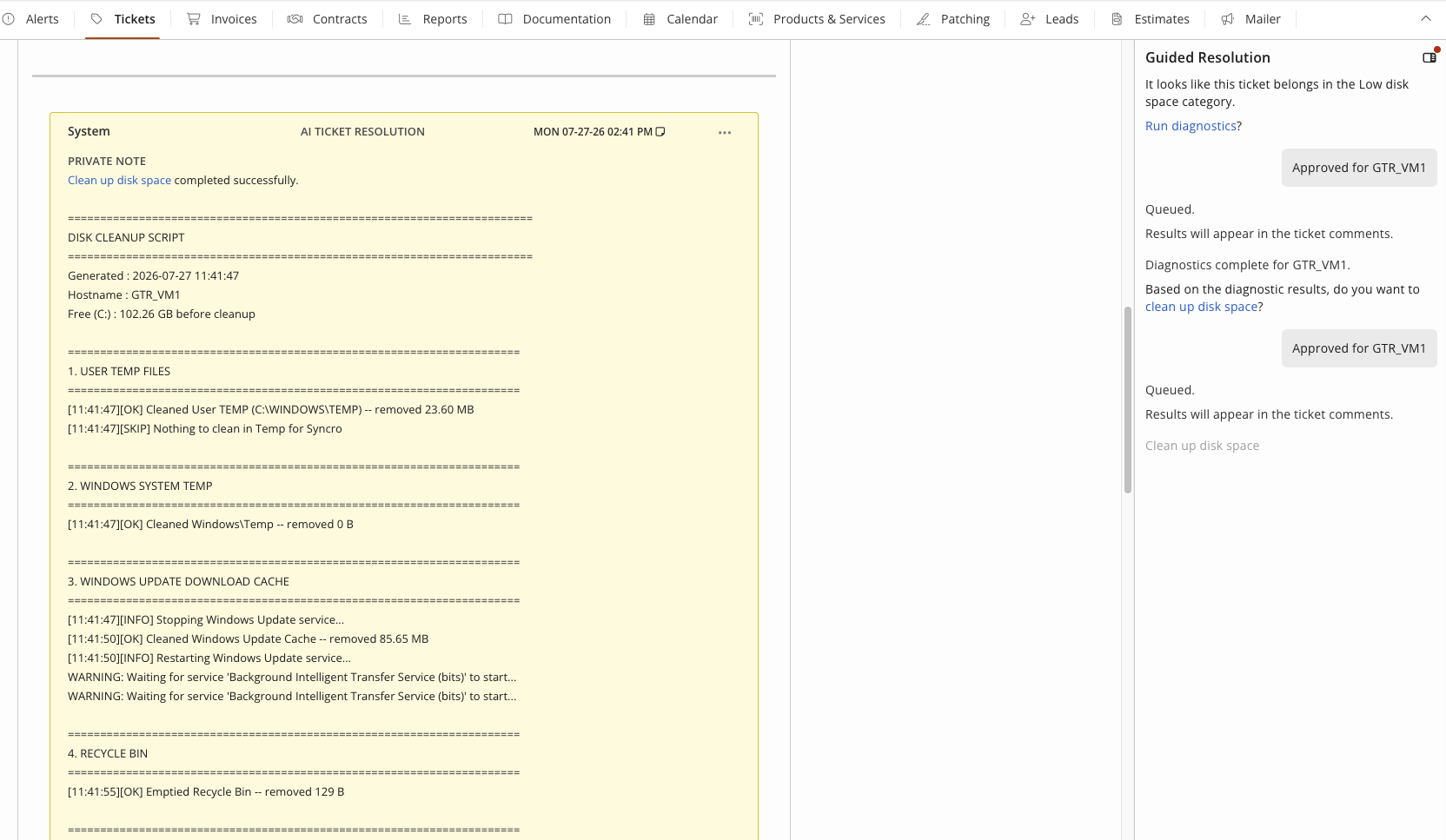
Guided Ticket Resolution helps automate remediation for common, known issues with recommended fixes or flows right on the ticket that a tech can approve with a click. The remediation panel automatically appears on eligible tickets at creation, identifying issues from the subject and description, and nothing executes without a technician’s explicit approval.
- Native Microsoft 365 identity actions. Password resets, MFA resets, sign-in blocks, and session revokes run from the ticket through Syncro’s existing tenant connection. No second portal, no second login.
- Curated scripts, inspected before they run. The technician sees the action, the target device, and the full script before approving. Syncro maintains them all.
- Guided diagnostics for vague tickets. “My computer is slow” triggers a diagnostic first, then advances based on what comes back.
- An immutable audit trail. Every suggestion, approval, decline, and result lands on the ticket with a timestamp and a name.
In Practice:
- A stolen laptop, reported at 4 PM: The panel surfaces Block Sign-In and Revoke Active Sessions for the linked identity. The technician approves both, the account is secured in seconds, and the whole sequence is logged on the ticket.
- The “I can’t log in” ticket: The panel surfaces a password reset for the linked Microsoft 365 contact. The technician approves, and it runs through Syncro’s existing tenant connection in under a minute, with no separate portal to open.
- The tenth low-disk ticket this month: The panel recommends a Syncro-curated cleanup script on the named device. The technician confirms the device, approves, and moves to the next ticket.
Syncro Service Desk Plugin: Better Service Delivery with Claude
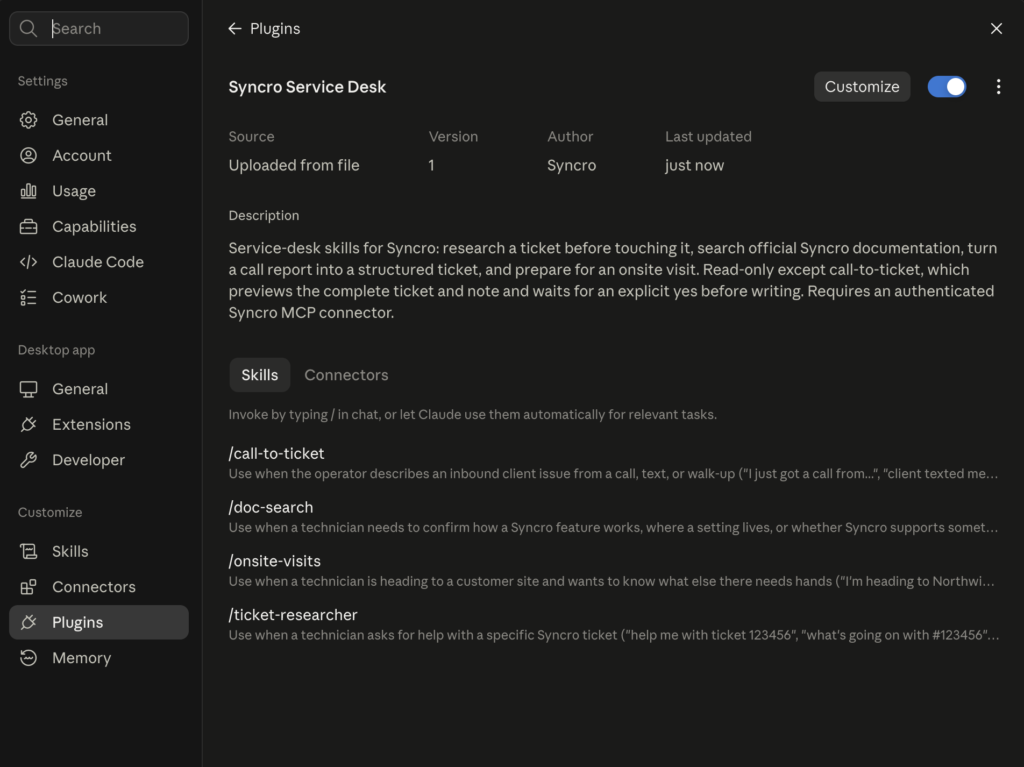
Most of what a technician needs to answer a call quickly and efficiently sits in Syncro or with their team, but finding it all can time consuming challenging: searching old tickets, checking another tech’s queue, asking a teammate what they did. The Syncro Service Desk Plugin for Claude includes skills for common service desk tasks that pull real tickets, assets, and customer history across sources, helping techs provide better, faster service.
Authenticate the Syncro MCP connection, install the Claude plugin, and four skills go live for the team:
- Call to Ticket. A tech describes what a client said on a call and the skill matches the Organization, End User, and asset, then drafts the ticket with priority and assigned tech for approval.
- Ticket Research Assistant. Returns a ranked list of things to try, built from the asset’s specs and that Organization’s resolved ticket history.
- Onsite Visit Prep. Surfaces every open ticket at a client site before a tech heads out, reducing duplicate site visits.
- Syncro Documentation Search. Returns the specific Syncro Doc Center article or Syncro system setting.
Every skill is written in plain language, not code, so you can customize them for your own unique workflows without a developer.
Custom Ticket View Columns: Per-Role Layouts, One Queue
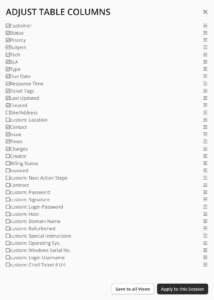
A dispatcher wants to see SLA countdowns, a billing manager is looking for unbilled charges, and a field tech wants the technical detail on the job. Before, every Syncro ticket view showed the same column set, so somebody was always scrolling past somebody else’s fields to get to what they cared about.
Custom Ticket View Columns lets you create per-role ticket views, so individual team members get the information they need quickly while all working from the same queue. Column configuration lives on the settings control you already use to manage a Ticket View, and teams that still want one consistent table everywhere can apply a single layout across every view from that same control.
In Practice:
- Building an SLA monitoring view: A service desk manager builds a dedicated view carrying response metrics and SLA status, and leaves the daily technician queue clean of columns techs do not act on.
- Auditing unbilled charges at month end: A billing manager builds a view surfacing total charge amounts and billable hours, and closes the month without digging past technical fields to find what has not been invoiced.
- Tracking a project’s billable effort: A project lead builds a Project Tickets view showing total billable time logged per ticket, so budget and schedule risk surfaces before the project runs over, not after.
There’s no cap on how many Ticket Views an account can create, and existing security group permissions still govern who can create or edit a view.
Ticket Timer Sync: Accurate Time Across Web, Mobile, and API
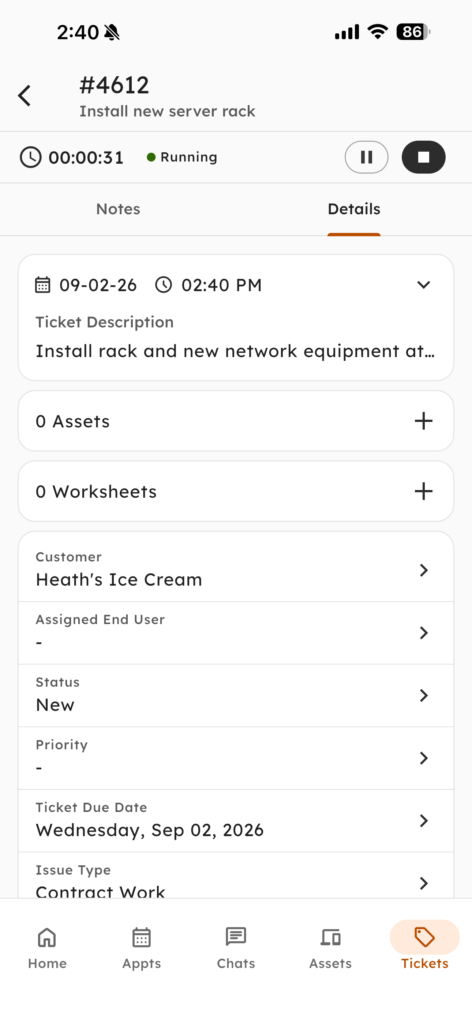
A tech starts a timer before leaving the office and forgets about it until lunch, or starts a second one on-site because they forgot the first was running. Either way, somebody wastes time reconciling two timers that were never talking to each other, and billable hours go missing.
Ticket Timer Sync keeps one timer state live across the Syncro Web App, Mobile App, and API. Start it at the desk, pause or stop it from the phone on-site, and the change reflects back instantly. Assigned tech, labor type, note, and billable status stay editable until the entry is charged.
In Practice:
- The office to on-site handoff: A tech starts a timer in the browser while prepping for a visit, then opens the ticket in Syncro Mobile on arrival, sees it still running, and taps Pause the moment the client wants to talk before work resumes.
- Fixing the billing detail mid-visit: Realizing the work belongs under a different labor type, a tech updates it from the Mobile App, adds a note, and toggles Billable off for an unrelated favor, all before the entry is ever marked charged.
- Live timer visibility for an ops lead: An internal dashboard queries every started, paused, and stopped timer across open tickets through the API, so “who is on a job right now” is answerable without waiting for an end-of-day report.
Product Bundles: Bill a Site Rollout as One Line Item
Sell a ten-workstation rollout as a bundle today and the invoice shows ten identical rows for the one thing the client actually bought, and working around that means breaking the bundle apart at the charge sheet, or skipping the serial numbers that keep the inventory count accurate.
Product Bundles now show up as a single line item everywhere it matters, across tickets, invoices, and estimates, no matter the quantity sold. No more five identical rows for what should be one clean charge, and no more creative accounting workarounds. Prefer distinct line items for individual bundles? You can still do that too.
- One line item, any quantity: A bundle added with a quantity above one displays as a single line across tickets, invoices, and estimates. Expand it in Ticket Charges when you need to see what is inside.
- Serial numbers assigned inside the bundle: Techs pick serials for serialized products directly from Ticket Charges, and those specific instances reserve reliably in stock.
- Recurring invoices that scale themselves: Bundles support quantities above one on Recurring Invoice templates and link to Contact and Asset counters, so the quantity tracks the client instead of a calendar reminder.
- Bundled sales visible in reporting: The Sales Detail Report identifies what sold inside each bundle, and bundles respect sort order alongside parent-level line items.
In Practice:
- A ten-workstation deployment: A tech building a workstation bundle on a ticket expands it in Ticket Charges, picks serial numbers for the serialized hardware, and reserves those exact instances in stock. Full traceability, with no inventory adjustment to make by hand afterward.
- A per-user onboarding package that grows with the client: An MSP attaches the bundle to a Recurring Invoice template and links it to the Contact Counter. The client hires four people, and next month’s invoice reflects it on a single line without anyone opening the template.
- Closing the books after a big rollout: Accounting pulls the Sales Detail Report and separates individual product sales from items sold inside bundles, so margin on the rollout is a number rather than an estimate. Bundles stop forcing a choice between an invoice the client can read and an inventory count your team can trust.
Coming Soon: Roadmap Highlights
Better ticketing continues with the full release of Automated Ticket Triage & Dispatch and Guided Ticket Resolution, Syncro’s Microsoft 365 and endpoint security posture strengthens, and quality of life releases close gaps around client experience and search.
- Automated Ticket Triage & Dispatch – General Availability: Team leads stop losing the first hour of every shift playing dispatcher. Priority scoring and technician matching happen the second a ticket lands, weighing workload, skills, calendar availability, and customer history.
- Guided Ticket Resolution – General Availability: Most help desk time goes to tickets that have the same answer every time. Disk cleanups, password resets, MFA resets, and session revokes get diagnosed and executed from the ticket in seconds, with a full audit trail.
- Microsoft 365 | Tenant Health Dashboard (Join Early Access): Auth failures, backup gaps, compliance drift, and baseline scores Microsoft does not expose, across every tenant, on one screen.
- Native ThreatDown Policy Deployment (Join Early Access): Select ThreatDown from the Managed Antivirus dropdown in any Asset Policy, and covered endpoints get the current installer and settings automatically. No more copying installer URLs and re-running scripts by hand.
- Draft Invoices (Join Early Access): An invoice created as a draft stays internal until you publish it, and the due date runs from the publish date.
- End User Portal | Custom Domains (Join Early Access): Point your own domain at the portal so clients see your brand. DNS verification and SSL renewal are automatic.
- Full-Context Ticket Search (Join Early Access): Find a ticket by almost anything you remember. Search covers comments, labor logs, worksheets, custom fields, and asset data, not just the subject line.
Learn more: Syncro Platform Roadmap
Frequently Asked Questions: September 2026
The Syncro Service Desk Plugin is designed to work with Claude specifically to accelerate common service desk tasks: creating a ticket from a call, researching a ticket to find a fix, prepping for an onsite visit, and searching Syncro documentation. However, you can still use the Syncro MCP Server to connect live Syncro data to other AI tools, such as ChatGPT, Copilot, Cursor, and more.
No. Guided Ticket Resolution requires explicit technician approval before any action runs, and every suggestion, approval, decline, and result is logged on the ticket with a timestamp and a name. It runs Microsoft 365 password resets, MFA resets, sign-in blocks, and session revokes from the ticket, with no second portal.
Yes. Custom Ticket View Columns lets you create per-role ticket views, so a dispatcher’s SLA view and a billing manager’s unbilled charges view surface different fields. There is no cap on views.
Yes. Ticket Timer Sync holds one timer state across the Syncro Web App, Mobile App, and API, updating in real time on whichever surface changes it. Labor type, note, assigned tech, and billable status stay editable until the entry is charged.
Stay Connected
- Release Webinar: Join us for a live demo and Q&A. Wednesday, September 9, 2026, at 1 PM EST
- Release Notes: See the September 2026 Release Notes for more details and a full list of quality-of-life improvements.

Share
Related Resources