
Key Takeaways
- Syncro Payments is now available: accept credit card and ACH directly in Syncro with no separate payment processor.
- Microsoft 365 Baselines: Rule Impact Details shows exactly which users, groups, and devices fail each security rule before you act.
- Microsoft 365 Baselines: One-Click Remediation fixes non-compliant rules directly from Syncro, individually or in batch.
- Microsoft 365 Baselines: One-Click Ticketing turns remediation tasks into a tracked, billable service tickets in one action.
- End User Portal SSO connects your identity provider so end users sign in with credentials they already have.
- Two API Report improvements: recurring invoice flagging and per-asset software inventory now available.
Two things have cost MSP and IT teams too much time for too long: chasing payments through tools that were never built for service businesses, and chasing down Microsoft 365 misconfigurations through a portal that was never built for speed.
Our release this month changes both. Syncro Payments brings credit card and ACH processing inside the platform, so you stop reconciling invoices across systems and start getting paid from the same place you do everything else. And three new Microsoft 365 Baselines updates complete the loop from detection to fix to billable ticket, without leaving Syncro once.
In This Update
- Syncro Payments: Get Paid Without the Overhead
- Microsoft 365 Baselines: Close the Loop From Detection to Billing
- End User Portal SSO: Remove Self-Service Barriers
- API: More Data, Better Reports
- Coming Soon: Roadmap Highlights
- FAQ
- Stay Connected
What’s New for June 2026
Syncro Payments: Get Paid Without the Monthly Fees
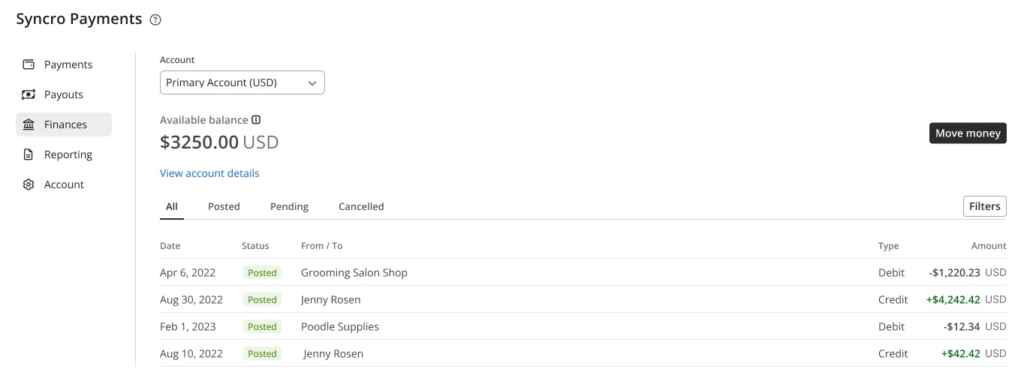
You run a service business. Getting paid shouldn’t be a job in itself.
According to PYMNTS, 60% of small and mid-sized businesses cite cash flow management as a critical challenge, with late payments as the leading cause. Industry research puts payment processing inefficiencies at 15 to 20 hours of administrative overhead per month for the average MSP, extending collection cycles by 8 to 12 days. The culprit is usually structural: a separate payment processor, manual reconciliation, and a support line that routes to someone who doesn’t know your account.
Syncro Payments fixes the structure. Credit card and ACH processing built on Stripe’s infrastructure, supported directly by the Syncro team. Sign up, process, manage, and report from the same workflow you already use for invoicing. Stored payment profiles applied automatically against recurring invoices remove manual collection overhead.
With Syncro Payments, pricing is predictable and transparent:
- Credit Card: 2.9% + $0.30 per transaction, regardless of card type or volume
- ACH: 0.8%, capped at $5.00 per transaction
- No additional monthly fees
In Practice:
- Recurring billing on autopilot. A stored ACH profile applies automatically against a client’s monthly invoice. An MSP owner checks the Syncro dashboard Monday morning: three invoices paid, no follow-up calls made, no separate platform to log into.
- Client self-service payment. A client’s office manager receives an invoice link, clicks it, lands in the End User Portal, and pays with a stored card. No phone call to the MSP, no check to process.
- One support line. A payment fails. An MSP owner contacts Syncro support directly. One team, one conversation, one resolution.
Syncro Payments In Action:
- 70+ Syncro Partners collecting payment to date
- 1000+ individual transactions processed
- 75% Credit Card
- 25% ACH
Microsoft 365 Baselines: Close the Loop From Detection to Billing
According to the Verizon 2026 Data Breach Investigations Report, misconfigured environments and stolen credentials account for the majority of confirmed cloud breaches year over year. Most teams know what’s wrong. Syncro’s Microsoft 365 Security Baselines already made it possible to monitor and detect that drift continuously.
The problem is what happens next: log into the Microsoft portal, find the setting, change it, return to Syncro, document the work, figure out whether to bill for it.
Three features shipping this month keep all of that inside Syncro: see who’s exposed, fix it in one click, and capture the work as a billable ticket.
Rule Impact Details: See What’s Breaking Before You Act
Knowing a rule failed tells you there is a problem. Knowing it affects 14 users tells you how serious it is.
Microsoft 365 Baselines: Rule Impact Details surfaces that context inside each rule’s detail view before you act. For example, the 2024 Microsoft Digital Defense Report found that only 41% of enterprise users are protected by MFA, meaning most organizations still have significant identity exposure. That gap is now visible.
In Practice:
- Prioritizing the remediation queue. A technician sees two failed rules. One affects three objects, and one affects 30. Rule Impact Details makes that distinction visible before a single change is made. The team fixes what matters first.
One-Click Remediation: Fix It Without Leaving Syncro
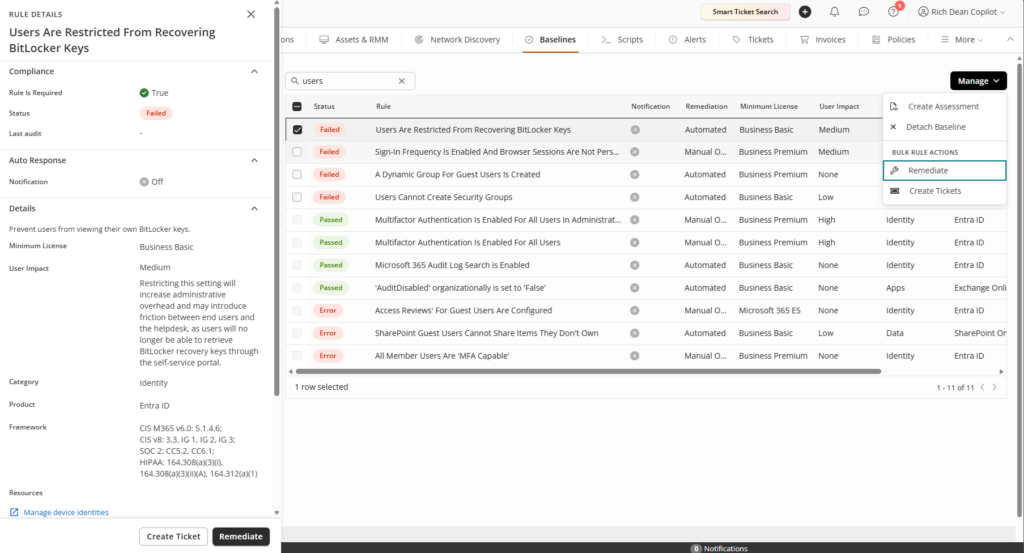
Every minute between detection and remediation is a minute of exposure. Traditional security posture alerts mean navigating to the right tenant, finding the impacted setting, applying the change, and then documenting it elsewhere. For a team managing dozens of tenants, that overhead accumulates fast.
Microsoft 365 Baselines: One-Click Remediation closes that gap from the compliance view itself. Select one failed rule or several, and Syncro handles the rest.
In practice:
- The drift alert. An IT admin gets a notification: “Modern Authentication for Exchange Online is Enabled” just failed on a tenant. They click Remediate in Syncro. The setting is corrected in M365 and marked compliant, without opening a second browser tab.
- The onboarding batch. An MSP applies a security baseline to a new client and finds 15 non-compliant rules. They select all 15 and click Remediate Selected. The controls are applied in one action. What used to take an hour of portal navigation takes minutes.
One-Click Ticketing: Turn Security Work Into Billable Tickets
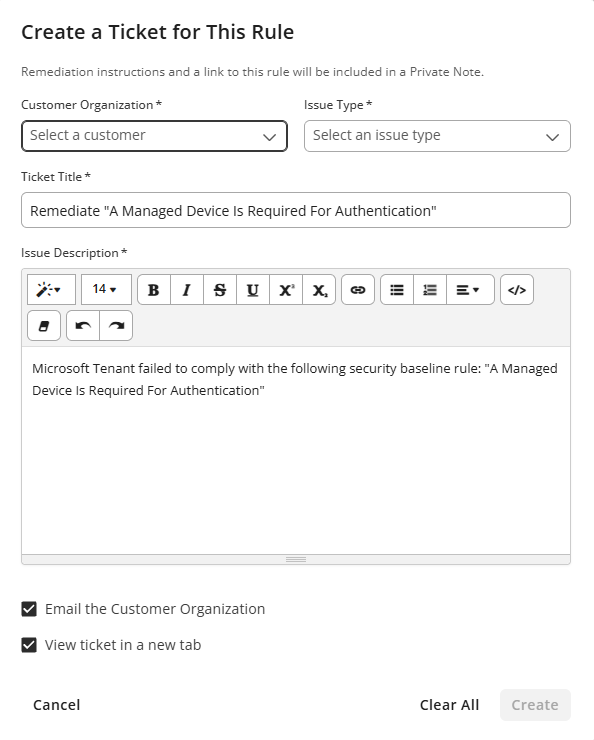
Security work has a billing problem. The labor is real, the expertise is real, and most of it never makes it onto an invoice.
A technician remediates a failed MFA rule, fixes the setting, moves on. No ticket. No time entry. No documentation. The client never sees it. You never bill for it.
Microsoft 365 Baselines: One-Click Ticketing fixes that at the source. Select one failed rule or a group of them, and Syncro generates a separate service ticket for each.
In practice:
- Tracking every remediation task. An IT admin remediates a failed MFA rule. Instead of adding a note to a spreadsheet, they click Create Ticket. A service ticket lands on the board, pre-populated with the rule name and remediation steps, ready to assign and time-track. The work is documented before they move on.
- Bulk onboarding. A baseline scan runs twice a day on a new client and finds 15 failed rules. A tech selects all 15 and clicks ‘Create Tickets’. Fifteen tasks land in the service board, assigned, tracked, and billable, in one action.
- The security services record. An MSP goes into a QBR with a client. They pull every ticket generated from M365 Baselines that quarter: a complete log of remediation work performed, time logged, and issues resolved. That record is what turns a managed security offering into a defensible line item on the invoice.
End User Portal SSO: Remove Self-Service Barriers
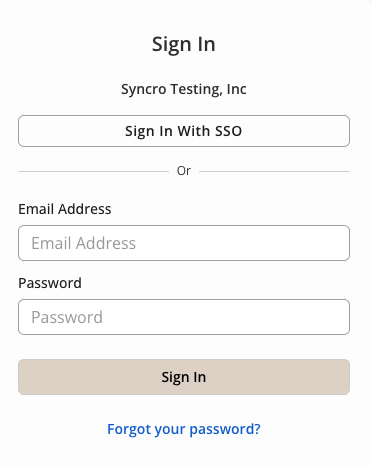
The End User Portal only delivers value when end users actually log into it. The most common reason they don’t is a unique password they set once and have not thought about since.
According to Forrester Research, the average help desk cost of a single password reset is $70, and the Gartner Group estimates that between 20% and 50% of all help desk calls are password-related.
End User Portal SSO removes that friction by connecting any OIDC-compliant identity provider (Entra ID, Google Workspace, or others) so end users sign in with the credentials they already use at work.
In Practice:
- Day one access, no friction. A new hire receives a portal invite and logs in with their existing company credentials. No password setup, no MFA enrollment, no reset ticket before they’ve submitted their first request.
- Invoice payment without the login barrier. An MSP’s client office manager clicks an invoice link and lands in the portal, already authenticated through their Microsoft 365 session. No password prompt. The invoice gets paid without a call to the help desk.
- Contractors stay in, no exceptions. Standard email/password login coexists on the same page, so partners or contractors outside the primary directory can still get in.
API: More Data, Better Reports
Two API improvements shipping this month give MSPs and IT departments cleaner access to data that previously required manual exports or custom workarounds:
- Recurring revenue and payment data: The API now flags recurring invoices and returns payment amounts per invoice, so you can separate recurring revenue from one-time billing in external dashboards, reconciliation workflows, and finance integrations without building your own logic.
- Per-asset software inventory: The API now returns full software inventory per asset, so license audits, vulnerability checks, and compliance reporting can pull current install data on demand.
Coming Soon: Roadmap Highlights
Our next release targets two of the most persistent friction points at the service desk: routing tickets to the right person, and finding tickets you only half-remember.
- Automated Ticket Triage and Dispatch (Join Early Access): High-priority work should not wait for a team lead to notice it. This feature surfaces priority and technician recommendations the moment a ticket lands, based on workload, skills, and resolved ticket history. One click to confirm.
- Full-Context Ticket Search (Join Early Access): Search that only covers subject lines misses most of what you remember about a ticket. This re-indexes all ticket data: comments, labor logs, worksheets, custom fields, tags, and asset data so you can find any ticket using a comment, a client name, or an asset serial.
Frequently Asked Questions: June 2026
Credit card transactions run at 2.9% + $0.30, regardless of card type or volume. ACH runs at 0.8%, capped at $5.00 per transaction. There are no additional monthly fees. Syncro handles payment support directly.
Remediation is always technician-initiated. When a rule fails, a Remediate button appears in the rule detail view. Technicians can confirm each fix individually or in batch.
Yes. Microsoft 365: One-Click Ticketing generates a service ticket from each failed baseline rule, pre-populated with the rule name and official remediation steps. Those tickets flow into the standard service board for assignment and time tracking, so every remediation is captured and billable.
No. SSO supports any OIDC-compliant identity provider, including Entra ID, Google Workspace, and others. Configuration happens per organization from the Organization Detail page. Both SSO and standard email/password login remain available simultaneously.
Stay Connected
- Release Webinar: Join us for a live demo and Q&A. Wednesday, June 10, 2026, at 1 PM EST/10 AM PST
- Release Notes: See the June 2026 Release Notes for more details and a full list of quality-of-life improvements across ticketing, the API, and the End User Portal.

Share
Related Resources