Key Takeaways
- Microsoft 365 Baselines: Full CIS Coverage completes the CIS Microsoft 365 Foundations Benchmark 6.0 with two new tiered baseline templates and a full library for all automatable rules, so you can match security depth to each client’s maturity level.
- End User Portal SSO: Microsoft and Google sign-in now work with zero per-org setup, plus auto-provisioning for organizations with SSO configured.
Every client needs a different depth of security, not one framework applied the same way to everyone. Microsoft 365 Baselines in Syncro now complete the full CIS benchmark with tiered templates for every client maturity level, from foundational hardening to the full rules library for all automatable rules.
End User Portal SSO is also expanding, making password-free sign-in easier to set up and faster to roll out.
In This Update
- Microsoft 365 Baselines: Full CIS Coverage
- End User Portal SSO: Sign In with Less Setup
- Coming Soon: Roadmap Highlights
- FAQ
- Stay Connected
What’s New for July 2026
Microsoft 365 Baselines: Full CIS Coverage
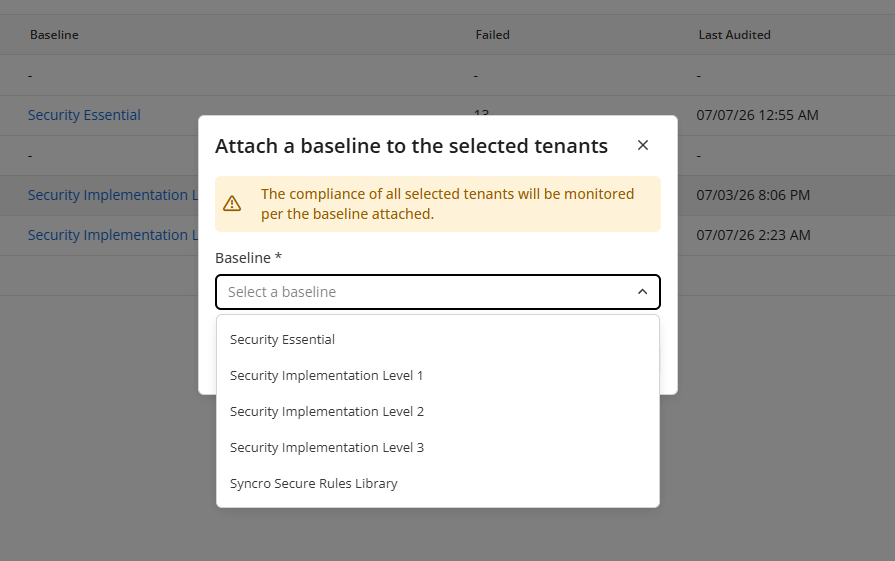
Weak passwords and permission misconfigurations take a median of nearly eight months to resolve half of all findings, according to Verizon’s 2026 Data Breach Investigations Report. Syncro’s Microsoft 365 Baselines already caught misconfigurations the Microsoft Admin Center never surfaces, starting with the foundational Level 1 controls added in April. This release completes Syncro’s integration of the CIS Microsoft 365 Foundations Benchmark 6.0, adding automated assessment and boolean remediation for every automatable rule, through two new tiered baseline templates and a full rules library.
Attach Security Implementation Level 2, Security Implementation Level 3, or the comprehensive Syncro Secure Rules Library to any Microsoft 365 tenant from the Baselines dashboard, each building on the foundational Level 1 baseline already in place. Together they add 42 new automatable rules, with boolean remediation shipping wherever a boolean fix exists, and Syncro evaluates every active rule against each tenant on a recurring 12-hour cycle, so drift gets caught the same day it happens.
In Practice:
- Onboarding a regulated client: A technician attaches Security Implementation Level 3 to a healthcare or finance tenant on day one, assessing the advanced identity and access controls that basic hardening doesn’t touch.
- Catching drift before it’s a finding: An end user disables a mandatory security setting. The rule flips to Fail, an alert fires through the enabled notification channel, and boolean remediation restores the compliant configuration without a technician opening the tenant.
- Proving coverage at the QBR: An MSP owner pulls the pass/fail status across the full CIS rule library for a client’s quarterly review, turning a security conversation into an audit-ready report.
Pick the tier that matches where a client actually is, from foundational hardening to the full rules library, without adding a second tool to track any of it.
End User Portal SSO: Sign In With Less Setup
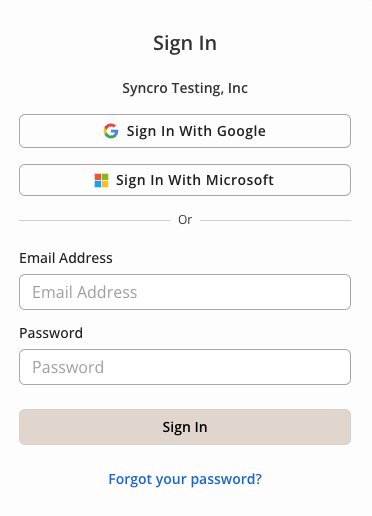
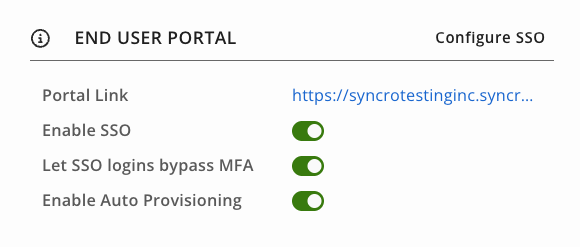
End User Portal SSO removed the need for a separate portal password in June, but only for organizations willing to configure an OIDC connection, including a client ID, secret, and discovery URL from their identity provider. That requirement is now gone. Partners whose customers run Microsoft 365 or Google Workspace now get password-free sign-in with zero per-org configuration. For organizations with OIDC SSO configured, auto-provisioning creates a portal account automatically the first time an existing contact signs in.
In Practice:
- A new client on Google Workspace: No OIDC connection to configure. You enable the portal, and the client’s end users sign in with their existing Google account from day one.
- A new hire at an OIDC-configured org: An employee at an organization with OIDC SSO already set up signs into the portal for the first time. A portal account is created automatically, no manual add step required.
- Mixed identity environments: An organization with OIDC SSO configured never sees the Microsoft or Google sign-in buttons. Contractors without a directory account still sign in with email and password, side by side with SSO users.
Every customer with a Microsoft or Google account can now skip the portal password, whether or not their partner ever touches an identity provider setting.
Coming Soon: Roadmap Highlights
MSPs often need to run their business from wherever they are, on whatever device is in front of them. Syncro MCP puts AI assistants like Claude, ChatGPT, or Copilot to work directly on your live ticket, asset, and customer data. Better ticketing continues with Automated Ticket Triage & Dispatch, the next chapter in the agentic ticket layer, with Technician Calendar Sync Accuracy and Full-Context Ticket Search closing gaps around scheduling and search.
- Syncro MCP Connector: Connect your AI tools, like ChatGPT, Claude, and Copilot, directly to your Syncro instance for live access to tickets, alerts, customers, contacts, assets, products, appointments, and invoices. Ask to update a ticket, prep for a site visit, book a follow-up, or turn a support call transcript into a ticket with the summary and next steps already filled in. Build automation on the same tools.
- Automated Ticket Triage & Dispatch (Join Early Access): Surfaces priority and technician recommendations the moment a ticket lands, based on workload, skills, and resolved ticket history, so nothing sits at the wrong priority because the queue was busy.
- Technician Calendar Sync Accuracy (Join Early Access): Recurring meetings, out-of-office periods, and working hours from connected Google and Outlook calendars sync reliably into Syncro, so technicians stop getting tickets routed to them during standing blocks and managers get a team availability picture they can actually plan from.
- Full-Context Ticket Search (Join Early Access): Searches across ticket comments, labor logs, worksheets, and asset data, not just the subject line, so you can find any ticket using whatever detail you remember about it.
- Script Execution Via Public API: Run scripts on your managed devices directly through the Syncro public API, enabling automated script execution as part of your broader workflows and integrations.
- Product Bundles: Site rollout bundles now act like one line item, not five identical copies of the same thing. MSPs packaging repeatable site rollouts, or bundling multiple products into one sellable package, get correct inventory reservation and consistent bundle behavior across tickets, invoices, and estimates.
- Mac Agent Enhancements (Join Early Access): Improved Mac agent stability and native ARM support.
Learn more: Syncro Platform Roadmap
Frequently Asked Questions: July 2026
Yes. This release completes Syncro’s integration of the CIS Microsoft 365 Foundations Benchmark 6.0, adding two new baseline templates, Security Implementation Level 2 and Security Implementation Level 3, plus the comprehensive Syncro Secure Rules Library. Partners and IT departments can now assess every automatable rule in the benchmark, with automated remediation wherever a boolean fix exists, at whatever tier matches a client’s maturity level.
Yes. Sign in with Microsoft and Sign in with Google are now built-in login options on the End User Portal with no per-org setup required. Organizations that need stricter, per-org OIDC SSO can still configure that separately, and OIDC takes precedence whenever both are available.
Stay Connected
- Release Webinar: Join us for a live demo and Q&A. Wednesday, July 15, 2026, at 1 PM EST/10 AM PST
- Release Notes: See the July 2026 Release Notes for more details and a full list of quality-of-life improvements across ticketing, the API, and the End User Portal.

Share
Related Resources