Average Resolution Time (often measured as MTTR — Mean Time to Resolution) is one of the most important IT help desk metrics.
Unfortunately, unticketed “shadow work” is common. Getting employees to submit quality tickets so IT can prioritize and resolve issues efficiently is a challenge nearly every IT professional understands.
A quick scan of r/sysadmin shows threads like:
- “Contacted by End Users (With No Service Ticket)”
- “Users who refuse to submit tickets”
- “Why do users hate tickets?”
The tension is understandable. Employees want problems solved immediately, and submitting a ticket can feel like friction — especially for busy professionals like lawyers, doctors, finance teams, or executives.
At the same time, IT is responsible for keeping the entire organization running. Tickets are the most reliable way to prioritize work, track workload, measure performance, and protect operational stability. This is especially true for small or one-person IT departments supporting fast-moving teams.
The best solution is to design a ticket workflow that aligns with how employees actually behave, simplifies data capture, and reinforces structured, accountable IT operations. To help you keep MTTR trending in the right direction, this article explores how to optimize ticket workflows. Syncro is used as an example platform, but the principles apply to any IT ticketing system.
How to Optimize IT Ticket Workflows
Optimizing ticket workflow requires process clarity, the right tools, automation, and clean data. Below are practical strategies to improve resolution speed and operational efficiency.
1. Make Ticket Creation the Easiest Path
If you take nothing else away from this article, remember this: employees follow incentives.
Imagine you’re a paralegal at a fast-growing firm and your printer stops working before a deadline. Are you going to:
- Follow the formal IT process
OR - Do whatever gets results fastest?
Most people choose speed.
If IT wants consistent ticket submission, submitting a ticket must be the fastest way to get help.
An effective ticketing process should:
- Make ticket creation simple. Long forms and unnecessary fields discourage compliance.
- Avoid rewarding bypass behavior. If messaging IT directly gets faster results than submitting a ticket, employees will skip the system.
- Include leadership support. If managers frequently override the ticket-first process, consistency breaks down. Leadership reinforcement is critical.
Email-to-ticket, desktop agents, or lightweight portals significantly reduce friction and improve adoption.
2. Capture the Right Information Early (But Only What’s Necessary)
Many help desk frustrations stem from repetitive back-and-forth communication. Capturing the right details early reduces delays.
Common useful fields include:
- Ticket category (e.g., hardware, access request, outage)
- Contact information
- Affected device or system
- Clear issue description
- Priority
- Current status
However, balance matters.
Requiring rarely needed details increases friction. For example, browser version may matter occasionally — but not in 95% of cases. Don’t require it upfront.
Aim to capture the 20% of data needed to resolve 80% of tickets. Additional details can be gathered later if needed.
Whenever possible, automate data collection. Device information, user data, and system logs should populate automatically rather than relying on manual input.
3. Automate Wherever Possible
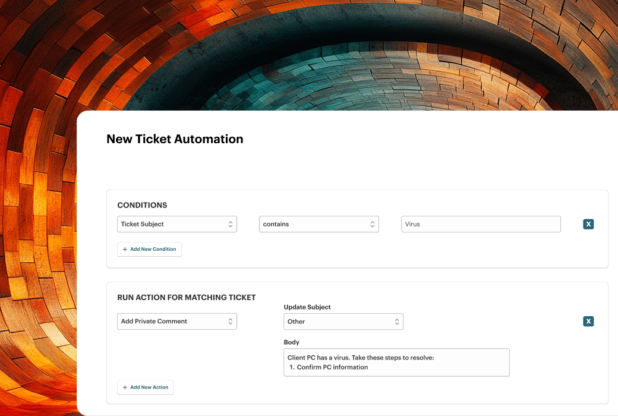
Automation is one of the most powerful ways to reduce MTTR.
With proper automation, IT can:
- Create tickets automatically from monitoring alerts
- Auto-assign and categorize tickets
- Update statuses based on activity
- Notify stakeholders intelligently
- Escalate aging tickets
- Trigger scripted remediation
- Close resolved alerts automatically
Automation removes repetitive manual steps and allows IT to focus on higher-value troubleshooting and strategic work.
4. Use Integrated Tools That Reduce Silos
A properly configured ticketing system can dramatically improve workflow efficiency.
For internal IT teams, especially small departments, integrating ticketing, asset management, and endpoint monitoring into a single platform reduces:
- Duplicate data entry
- Context switching
- Manual tracking
- Missed alerts
For example, when endpoint monitoring detects high CPU utilization or a crashed service, a ticket can be created automatically and remediated without waiting for an employee to report it.
AI-assisted ticket management further improves efficiency by:
- Surfacing relevant device information
- Suggesting classifications
- Recommending common resolutions
Ease of use matters as much as features. Free trials help validate real-world usability before committing to a platform change.
Three High-Impact Ticket Workflow Automations
Automation is most effective when applied strategically.
Automate Notifications Without Creating Noise
Critical alerts — such as system outages or priority escalations — should be visible immediately. However, too many alerts cause fatigue.
Granular notification policies ensure IT is alerted when action is required, without flooding inboxes with low-priority updates.
Automatically Escalate or Close Aging Tickets
Tickets often sit in “pending” states waiting for user confirmation. Others should escalate but don’t.
Automated rules can:
- Escalate tickets not updated within X hours
- Close tickets pending confirmation after defined timeframes
- Trigger follow-up reminders
This prevents resolution metrics from being distorted and keeps the queue clean.
Integrate Ticketing with Endpoint Monitoring
Endpoint monitoring and device management tools can detect issues before employees notice them.
When monitoring integrates directly with ticket workflows:
- Alerts generate tickets automatically
- Remediation scripts trigger without manual action
- Tickets close when issues resolve
This shifts IT from reactive troubleshooting to proactive operational management.
Optimizing Existing Ticket Backlogs
Most IT departments aren’t starting from scratch. Improving workflows often means cleaning up existing queues.
Quantify Your MTTR
MTTR measures the average time required to resolve tickets. If resolution times trend upward, employee productivity, executive confidence in IT, and operational stability suffer.
Start by auditing your current MTTR. Remove duplicates, close resolved tickets, and clean inaccurate data before measuring performance improvements.
Most modern ticketing systems provide resolution-time reporting and customizable dashboards.
Categorize and Visualize Tickets
Messy ticket queues hide problems.
Organize tickets by:
- Status
- Priority
- Technology
- Due date
- Department
Visualization helps identify bottlenecks, recurring issues, and tickets that slipped through the cracks.
Merge Duplicate Tickets
Duplicate tickets increase noise and waste time. During outages, multiple employees may submit identical requests. Merging duplicates keeps data clean and prevents redundant work.
Effective triage reduces clutter and improves reporting accuracy.
Building an Efficient Ticket Workflow with Syncro
Syncro combines ticketing, endpoint monitoring, remote access, automation, and reporting into a centralized platform.
For small or lean IT departments, consolidating tools reduces operational overhead and eliminates dashboard sprawl.
Key capabilities include:
- Custom ticket fields
- Email-to-ticket creation
- Desktop ticket submission
- Workflow templates
- Automated remediation
- Customizable reports
Workflows can be tailored to specific issue types, with default field values and automation rules reducing repetitive entry.
Templates streamline communication and ensure consistency.
By combining monitoring and ticketing in one system, IT gains visibility from alert detection through resolution and reporting.
Is It Time to Modernize Your Ticketing System?
Many IT teams continue using legacy tools because migration feels disruptive.
However, daily inefficiencies compound over time. Manual processes, tool sprawl, and slow workflows quietly increase workload and burnout risk.
Modern, integrated platforms can streamline ticket workflows, automate resolution steps, and improve visibility into performance metrics like MTTR.
If you’d like to see how Syncro can simplify ticket management and help your IT department operate more efficiently, start a free trial and evaluate it in your environment.
Frequently Asked Questions
An IT ticket workflow defines how service requests move from creation to resolution. It includes ticket submission, categorization, prioritization, assignment, escalation, remediation, and closure. A well-designed workflow reduces delays and improves operational visibility.
IT teams reduce resolution time by simplifying ticket creation, capturing key information early, automating triage and escalation, integrating monitoring with ticketing, and tracking MTTR consistently. Automation and clean categorization prevent tickets from aging unnoticed.
MTTR (Mean Time to Resolution) measures the average time required to resolve a ticket from creation to closure. It is a critical IT performance metric used to evaluate service efficiency and identify process bottlenecks.
Employees often bypass ticketing systems when the process feels slow or complex. Simplifying submission through email-to-ticket, portals, or desktop agents — and reinforcing a ticket-first policy — improves compliance and reduces shadow work.
Automation accelerates ticket routing, categorization, escalation, and remediation. For example, monitoring alerts can automatically generate tickets, apply priority rules, trigger scripts, and close resolved issues — allowing IT teams to focus on complex problems.

Share
Related Resources