Key Takeaways
- RMM (remote monitoring and management) is the software MSPs use to monitor, maintain, and fix client endpoints remotely, from a single console.
- The core jobs of RMM are real-time monitoring, automated patch management, remote access, and scripting and automation.
- RMM moves an MSP from reactive break-fix to proactive management, which protects client uptime and your margin at the same time.
- RMM manages the devices; PSA runs the business (tickets, billing, reporting). Most MSPs run both, and it is easier when they live in one platform.
- When you evaluate an RMM, weigh OS coverage, automation depth, and the pricing model: per-endpoint pricing punishes growth, per-technician pricing scales with you.
What Is RMM? An MSP’s Guide to Remote Monitoring and Management
Managing hundreds of client endpoints across dozens of businesses is not a problem you can hire your way out of. It is a tooling problem.
Without a way to see and fix machines remotely, every failing hard drive and missed patch becomes a phone call, a scheduled visit, and an hour of non-billable drive time. Margin leaks out one truck roll at a time, and clients only hear from you when something is already broken.
Remote monitoring and management is the category of software built to close that gap. This guide explains what RMM is, how it works, what it does, how it differs from PSA, and how to evaluate a tool, written for MSPs first, with notes for internal IT teams where the two diverge.
What is RMM?
RMM stands for remote monitoring and management. It is the software that MSPs and IT teams use to monitor the health of client endpoints, and to maintain and fix those endpoints remotely, from one central console.
The term does double duty. “RMM” can mean the ongoing practice of keeping client systems healthy, and it can mean the RMM tool (also called an RMM platform) that makes the practice possible. When someone asks “what is an RMM tool,” they are asking about the software: the agent, the console, and the automation that runs on top of them.
The “endpoints” an RMM manages are the devices your clients run on: desktops, laptops, and servers, and often network gear like routers, switches, and firewalls. The RMM is where a technician sees all of them at once, instead of logging into each machine one at a time. It reads more like a neutral category primer than a Syncro pitch, in line with the industry definition of remote monitoring and management.
How does RMM work?
RMM is agent-based. You install a lightweight piece of software, the agent, on each endpoint you manage. From then on, two things flow in opposite directions.
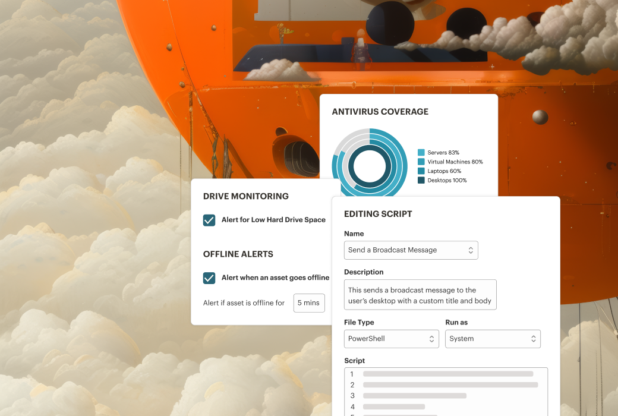
Monitoring data flows up. The agent continuously reports device health, running processes, services, and system activity back to the central console. When a metric crosses a threshold you set, such as low disk space or a stopped service, the console raises an alert.
Management actions flow down. From that same console, a technician (or an automation) can push a patch, run a script, open a remote session, or apply a policy to one machine or a thousand at once.
That loop is the whole point of RMM: you see a problem forming and act on it remotely, before a user ever files a ticket.
What does RMM software do?
Capabilities vary by tool, but a modern RMM is expected to cover six core jobs.
Real-time endpoint monitoring
The RMM tracks device health, processes, services, and system activity in real time, and sends alerts when something needs attention so technicians can prioritize by severity rather than by whoever shouts loudest.
Automated patch management
Unpatched software is one of the most common ways client environments get breached. A good RMM deploys and schedules operating-system and third-party patches, with compliance reporting so you can prove machines are current. See patch management for how this works in practice.
Remote access and troubleshooting
When hands-on help is needed, remote access lets a technician connect to an endpoint and resolve the issue without disrupting the user or driving to the site.
Scripting and automation
This is where leverage comes from. A capable scripting engine lets you automate repetitive tasks across many machines at once using PowerShell, Mac, and custom scripts, so one technician can do the work of several.
Policy-based management and automated remediation
Policies let you standardize monitoring and maintenance across every client from a single set of rules. Automated remediation takes it further: when an issue is detected, the RMM can trigger a script, raise an alert, or open a ticket on its own.
Reporting
Client-facing reports turn invisible background work into something a client can see: uptime, patched vulnerabilities, and recurring issues. This is how MSPs demonstrate the value they deliver every month.
RMM vs PSA: what is the difference?
RMM manages the technology; PSA runs the business. RMM keeps client devices healthy. PSA (professional services automation) handles the operational side of the MSP: tickets, time tracking, billing, and client reporting. They answer different questions.
| RMM | PSA | |
|---|---|---|
| What it manages | Client endpoints and devices | The MSP’s business operations |
| Core jobs | Monitoring, patching, remote access, scripting | Ticketing, billing, time tracking, reporting |
| The question it answers | “Are my clients’ systems healthy?” | “Did we capture and bill the work we did?” |
| Who lives in it | Technicians delivering client work | Techs, dispatchers, and the people who invoice |
Most MSPs run both. The friction shows up when they are separate tools that do not talk to each other, so the same work gets logged twice. Running RMM and PSA in one platform means an alert can become a ticket, and billable time can be captured, without anyone rekeying it.
Why MSPs use RMM
The biggest shift RMM enables is from reactive break-fix to proactive management. Instead of waiting for a client to report an outage, you catch the warning signs and fix them first. That single change protects client uptime and your reputation.
RMM is also what makes an MSP scalable. Because monitoring, patching, and scripting run across many endpoints at once, one technician can support far more devices than they could by hand. That is the difference between adding clients and adding payroll.
And because RMM automates patching and flags suspicious activity, it directly strengthens each client’s security posture, which is increasingly what clients are actually buying.
Using RMM to fix issues before they escalate
Here is what proactive management looks like in practice. An endpoint’s disk starts filling up. Monitoring catches it at 90 percent and raises an alert. An automated remediation workflow runs a cleanup script, confirms the result, and only pages a human if the script fails.
The user never notices, and no ticket is ever filed. Multiply that across every client and every common issue, and the RMM quietly absorbs the routine work that used to eat your team’s day.
How to choose an RMM
Once you know what RMM does, the evaluation comes down to a handful of factors that separate a tool you will outgrow from one that scales with you.
- OS and device coverage. Some tools handle Windows well but stumble on Mac, or cover devices but not network gear. Match coverage to your actual client base.
- Automation and scripting depth. This is where the leverage lives. Shallow automation caps how many endpoints one tech can manage.
- Integration with PSA and M365. If your RMM and PSA do not share data, you pay for it in double entry.
- Deployment speed. Some RMMs take weeks of configuration before they deliver value. Faster onboarding gets you to ROI sooner.
- Pricing model. This is the one MSPs most often get burned on. RMM priced per client endpoint gets more expensive with every device you add, which punishes growth. RMM priced per technician stays predictable as you scale.
For a side-by-side of specific tools, see our comparison of the best RMM software for MSPs, and check the pricing model closely on the pricing page of any vendor you shortlist.
How Syncro fits
Syncro is one option built specifically around the scaling problem above. Its RMM puts monitoring, automated patching, scripting, and remote access in one console, with remote access via Splashtop included at no extra cost, and pricing per technician rather than per endpoint so your bill does not balloon as you add client devices.
The piece MSPs tend to notice first is automated remediation: alerts can create tickets, run scripts, confirm the result, and notify a technician only when needed, so routine issues resolve themselves. It is not the only RMM on the market, but if per-endpoint pricing and tool sprawl are what is holding your MSP back, it is built for that specific problem.
See RMM that scales with your MSP, not against it. Syncro gives you monitoring, patching, scripting, and remote access in one platform, priced per technician. Start a free trial or book a demo.
Frequently Asked Questions About RMM (Remote Monitoring & Management)
RMM stands for remote monitoring and management. It refers both to the practice of managing client endpoints remotely and to the software MSPs and IT teams use to do it.
An RMM tool is the software platform that monitors client endpoints and lets technicians maintain and fix them remotely. It combines an agent installed on each device, a central console, and automation for patching, scripting, and alerting.
RMM manages the technology (monitoring, patching, remote access, scripting), while PSA manages the business (ticketing, billing, time tracking, reporting). Most MSPs use both, and they work best when integrated in one platform.
RMM is designed primarily for managed service providers, who use it to support many clients at once. Internal IT departments also use RMM to manage devices for remote and hybrid employees from a central console.
An agent installed on each endpoint reports health and activity back to a central console, and the console pushes patches, scripts, and policies back down to the devices. This lets technicians detect and fix problems remotely, often before a user notices.
No. Remote access is one feature within RMM. RMM is the broader platform that also handles monitoring, patch management, scripting, and automation across all managed endpoints.
Per-technician pricing is generally more scalable than per-endpoint pricing. Per-endpoint models get more expensive with every device you add, while per-technician pricing keeps costs predictable as your client base grows.
Both. RMM is built for MSPs first, but internal IT teams use the same tools to monitor, patch, and support company devices, especially across remote and hybrid workforces.

Share
Related Resources