
Key Takeaways
- Syncro Credits is how Syncro prices AI capabilities like ticket dispatch and guided fixes, built around control over what runs, transparency in every action, and numbers you can verify.
- Your Syncro plan price doesn’t change, and AI Ticket Summarization stays included with unlimited use.
- Your account gets 150 free credits per licensed user each month, pooled so the whole team can share them.
- The Credit Usage Dashboard shows how many credits your team has used from its free pool and which ticket, tech, and client each credit went to. MSPs can use that to price AI into client contracts, and IT teams can use it to plan their budgets.
You shouldn’t have to commit to an AI bill before you trust the capabilities or know what value they’ll bring. AI only pays off when your team actually uses it, and no MSP lets software act in a client’s environment until it has earned that trust.
So at Syncro, we built trust into the platform first. You decide whether each AI capability runs at all, and what it’s allowed to do on its own.
Syncro Credits carries that same approach into pricing. Your plan price covers the platform your team uses every day. Credits cover the AI capabilities that do part of the work for you, like routing a ticket to the right tech or walking a tech through a fix, such as a password reset. A credit is used only when your team puts that work to use, and whether to pay for more of it is always your call.
Control, transparency, and proof you can check are what we promise with every AI capability we ship. Below, we explain how that promise shaped Syncro Credits, how credits work, and how you’ll monitor and control your team’s usage.
Why AI Pricing Is Tricky for MSPs
Vendors across the industry are still working out how to price AI. Some include it in the seat price, some sell it as an add-on, and some charge by usage. Each approach works well for some teams and creates tradeoffs for others.
For MSPs, the biggest risk is a mismatch between how vendors charge them and how they charge their own clients. As Omdia principal analyst Jessica Davis told Channel Dive in May 2026, when those two pricing models don’t line up, MSPs “could get left holding a lot of cost without pricing appropriately to the end users.”
Here’s how that plays out. An MSP signs a client to a flat monthly rate. Later, a tool they use to serve that client starts charging by usage. When the client has a heavy month, the MSP’s cost goes up, but the client’s invoice stays the same. The difference comes out of the MSP’s margin.
Usage pricing has a real upside, since you only pay for what your team uses. But for it to work for an MSP, you have to see usage as it happens, be able to limit it, and know which client it came from. We designed Syncro Credits with all three in mind.
Why We Built Syncro Credits This Way
Every AI capability we ship follows the same promise: control, transparency, and proven impact. Your team should decide what to automate, understand the impact and value it provides, and assess the cost before paying for any of it. Syncro Credits puts that promise into practice through four guiding principles.
1. Proven Impact: Credits Are Only Used When You Get Value
AI suggestions aren’t always right, and your techs are the final judge. When a tech overrides a suggestion, the AI didn’t provide value, so it shouldn’t use a credit.
Credits are used only when your team agrees with a suggestion or lets it run automatically.
2. Trust: You Decide When to Automate
Every team adopts automation at its own pace, and trust in AI gets built one action at a time. A service manager who has watched Ticket Triage & Dispatch route hundreds of tickets correctly will make a different call than one who turned it on last week.
Start with suggestions your techs have to approve, then move to automation for the decisions you trust. Every recommendation, override, and approval shows up with a name and a timestamp, so there’s never a question about what happened or who made the call.
3. Predictability: You’ll See Costs Before You’re Billed
We believe no one should learn what a feature costs from an invoice. For an MSP, an unexpected vendor charge comes straight out of the margin on client contracts that are already signed. For an internal IT team, it can mean a mid-year conversation with finance that nobody planned for.
4. Cost Control: Your Admin Sets the Spending Limit, Not Syncro
The person who owns the budget should decide how much to spend on AI. It shouldn’t be up to Syncro, nor should it depend on which tech has the busiest month.
After January 2027, nothing runs past your free credits unless an Admin chooses to raise the limit. Your team gets time to see where AI is paying off, then decides whether to go further before ever reaching the edge of the pool.
How Syncro Credits Work in Practice
Every Team and IT account gets 150 free credits per licensed user each month, pooled for the whole team. A five-tech account, for example, gets 750 credits a month that anyone on the team can draw from. The pool resets at the start of each month.
Each AI capability uses a set number of credits per ticket:
- Automated Ticket Triage & Dispatch: 1 credit
- Guided Ticket Resolution (Open Beta): 5 credits
AI Ticket Summarization stays included, with unlimited use.
When your team uses up its free credits, AI capabilities pause until the next month, and no charges are incurred. If an Admin wants them to keep running, they can set a monthly spending cap. Credits past the pool then cost $0.10 each, up to that cap.
Here’s how that works for a five-tech MSP handling about 500 tickets a month, where roughly 1 in 10 tickets is the kind of issue Guided Resolution can help with:
- Typical month: Triage & Dispatch on all 500 tickets (500 credits) plus Guided Resolution on 50 of them (250 credits) totals 750 credits, which the free pool fully covers.
- Busy month: Guided Resolution handles 100 tickets instead of 50, for a total of 1,000 credits. With a cap in place, the extra 250 credits cost $25. Without one, AI capabilities pause when the pool runs out.
*Free through January 2027: Everything above takes effect after January 2027. Until then, AI capabilities that use credits are free, nothing pauses, and the Credit Usage Dashboard shows what any usage past your free pool would have cost.
Visibility and Control
Visibility, measurement, and capability controls are key to proving value and managing costs.
The Credit Usage Dashboard gives Admins a live view of how their team is using Synco’s AI capabilities, where they’re seeing impact, and what’s approaching credit limits, so there are no billing surprises.
On the dashboard, you can:
- See how many credits your team has used against its free pool on any day of the month
- Use the Activity Ledger to track every credit used, with the ticket, tech, client, capability, and time. You can search, filter, and export it.
- Compare usage month to month, so you can tell a one-time spike from a real trend
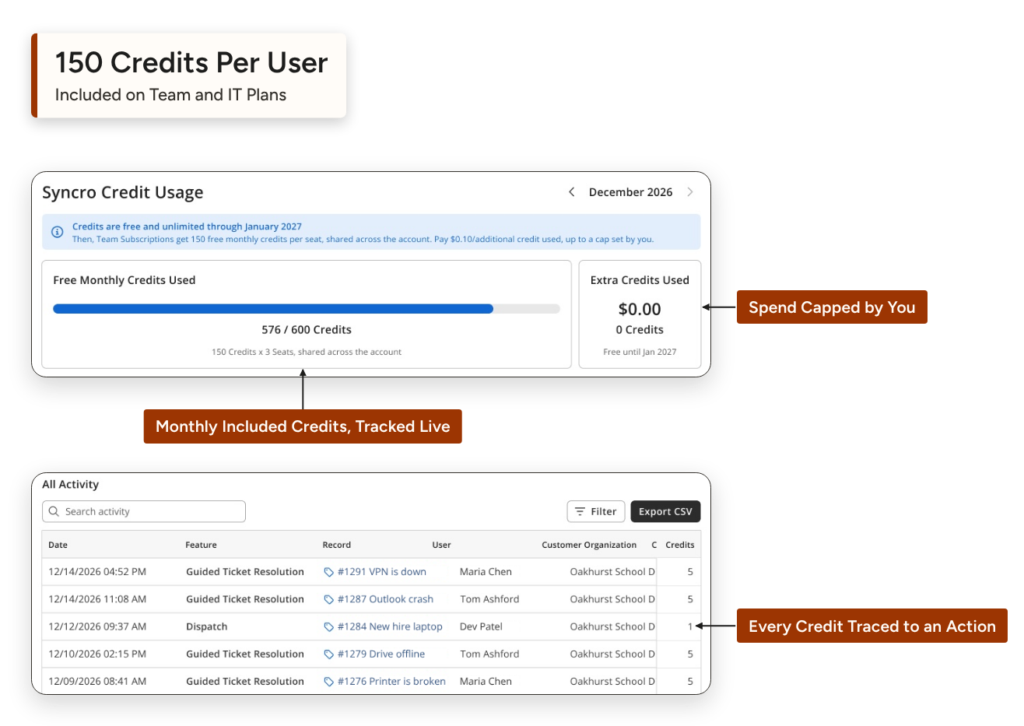
For MSPs having a busy month, owners can filter the ledger by client, see which account drove the spike, and bring a real number to that client’s renewal. IT teams can check whether there’s room in the pool to enable another capability and walk into next year’s budget planning with actual usage data.
In addition, admins control capability activation and spending. They can turn each capability on or off, or shut off all of them with a single setting. A capability that’s off uses no credits. And after January 2027, nothing bills past your free pool unless an Admin sets a monthly spending cap. Admins get notified as usage nears the cap and can raise or lower it at any time. Without a cap, AI capabilities pause when the pool runs out and resume next month, and nothing is billed.
What’s Next for Syncro Credits
Automated Ticket Triage & Dispatch and Guided Ticket Resolution are the first AI capabilities to use Syncro Credits, with more to follow. Every new capability will work the same way:
- We’ll publish its credit cost when it launches.
- It will draw from the same monthly pool.
- You’ll get a notice before it starts using credits, so you can review your cap or turn it off.
- Its usage will show on the Credit Usage Dashboard, by ticket, tech, and client.
Decide with Your Own Data
There’s still no standard way to price AI in IT tools, and every approach comes with tradeoffs. With Syncro Credits, we chose the approach that keeps the decisions with your team.
Credits are used only when an AI action is applied. You choose which capabilities run and how much they’re allowed to do on their own. The Credit Usage Dashboard shows every credit by ticket, tech, and client, and nothing bills past your free pool unless an Admin approves it.
That combination lets you adopt AI the way you’d adopt any new tool in a client’s environment: start small, check the results, and expand once it has proven itself. Your usage data, not a pricing sheet, tells you when it’s time to do more.
Want the setup details? Read the Syncro Credits guide in the Syncro Doc Center for admin settings, billing details, and step-by-step instructions.
Frequently Asked Questions About Syncro Credits
Syncro Credits is how Syncro prices AI capabilities that do work on your team’s behalf, starting with Automated Ticket Triage & Dispatch and Guided Ticket Resolution. Every Team and IT account gets 150 free credits per licensed user each month, shared across the account. The Credit Usage Dashboard tracks every credit used.
No. Your per-user plan price stays the same. Credits apply only to AI capabilities that do work for your team, and AI Ticket Summarization stays included with unlimited use.
Automated Ticket Triage & Dispatch uses 1 credit per ticket, and Guided Ticket Resolution uses 5 credits per ticket. Credit costs for new AI capabilities will be announced as they launch.
No. A credit is used only when your team accepts an AI action, takes steps that match an AI suggestion, or lets the action run automatically. Suggestions your techs override or decline don’t use credits.
Yes. Admins can turn each AI capability on or off individually, or turn off all AI capabilities at once. An account with its credit-based capabilities turned off uses no credits. For capabilities that are on, your team can start with suggestions that techs approve one at a time and move to automation when you’re ready.
Not until after January 2027. AI capabilities that use credits are free until then, however many credits your team uses. After January 2027, usage past your free pool is billed only if an Admin sets a monthly spending cap.
Through January 2027, nothing is billed and nothing pauses. After that, if no spending cap is set, AI capabilities pause when the free pool runs out, the Admin is notified, and everything resumes the next cycle. With a cap, extra credits cost $0.10 each until the cap is reached, and Admins are notified as usage gets close.
The Credit Usage Dashboard shows how many credits your team has used against its free pool, month-by-month trends, and an Activity Ledger of every credit by ticket, tech, and client. Through January 2027, it also previews what any usage past your free pool would have cost, so you can size a cap from months of real data before billing starts.
Every credit in the Activity Ledger is tied to a client, along with the ticket and technician. MSPs can see which clients drive AI usage and use that data when setting client pricing and renewals.
Syncro Credits applies to AI capabilities on the Team and IT plans, not the Core plan. The pool resets every month, and unused credits don’t roll over.

Share
Related Resources