Modern IT departments rely on structured collaboration to resolve incidents quickly and accurately. Clear ownership, focused communication, and controlled notifications are essential to keeping tickets moving toward resolution without creating confusion or noise.
Syncro’s ticket collaboration features are designed to streamline communication, reduce delays, and ensure the right stakeholders stay informed throughout the resolution process.
Here’s a closer look at Syncro’s collaboration capabilities and how IT teams can use them effectively.
Collaboration Features That Improve IT Ticket Resolution
There are a few primary features that Syncro users can take advantage of to power effective ticket collaboration:
Subscribing to a Ticket
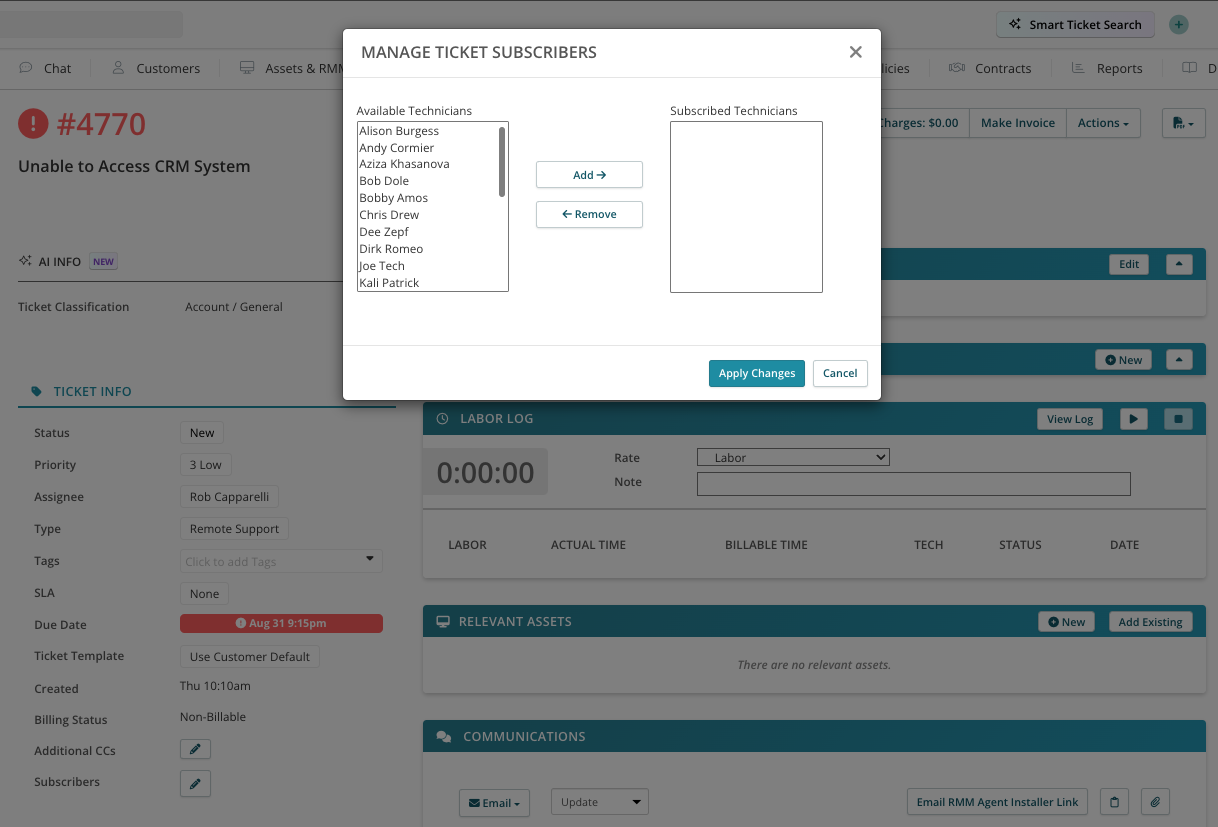
While it is important to ensure tickets are properly assigned, there are situations where additional stakeholders need visibility.
Whether a senior engineer is mentoring a junior team member, additional technical review is required, or cross-functional input is needed, subscribers can be added to tickets. While only one assignee can be attached to a ticket at a time, any number of subscribers can be included to maintain structured collaboration without disrupting ownership.
@Mentions
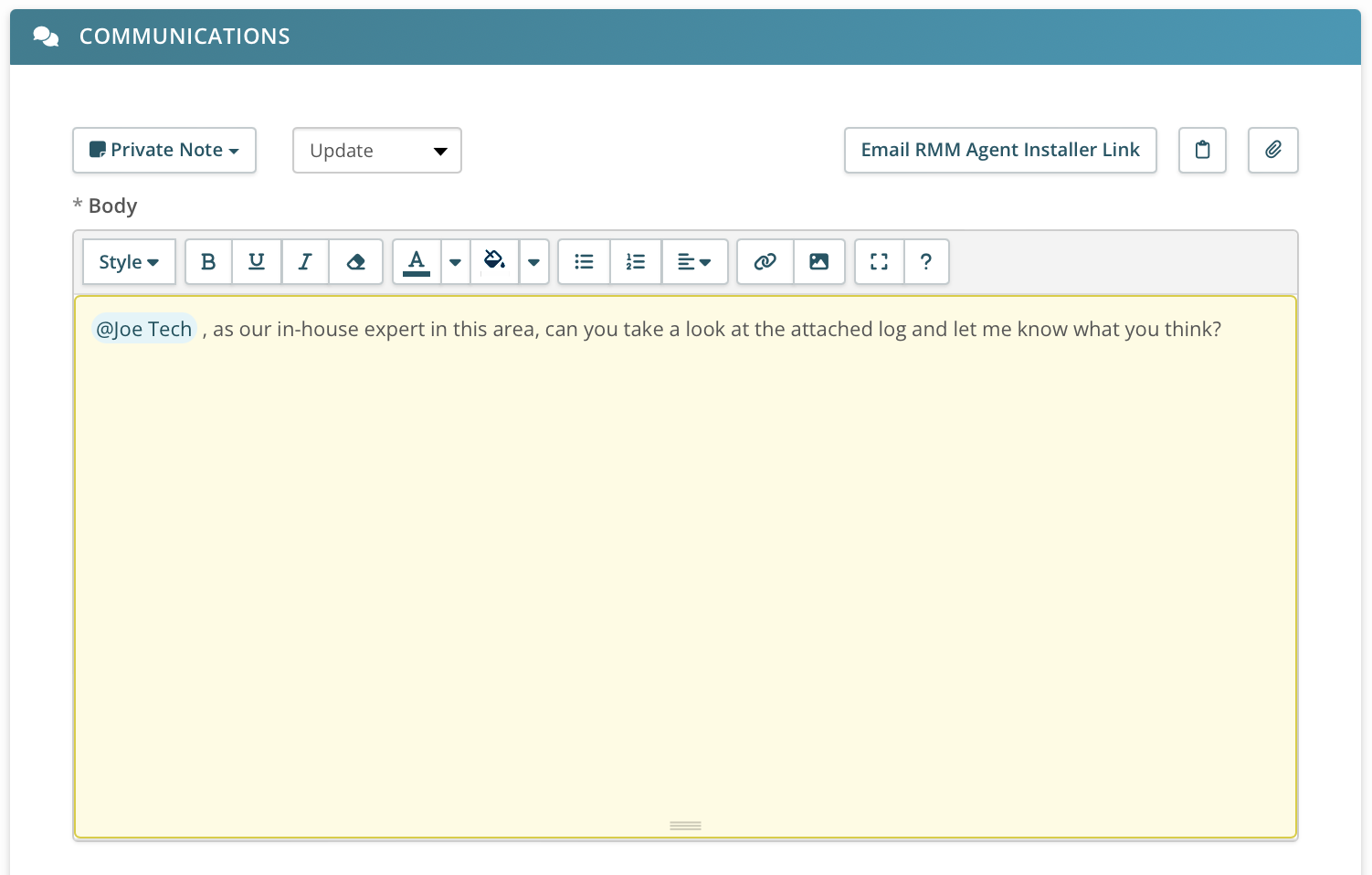
Technicians can mention others within ticket communications. This feature can be used in two ways:
- @Mentioning a technician automatically notifies them and brings the ticket comment to their attention.
- @Mentioning a customer or stakeholder includes that individual in the message, allowing technicians to direct questions or provide updates to specific contacts beyond the original requester.
These features ensure that the right people are notified at the right time, keeping communication targeted and reducing unnecessary noise while maintaining transparency.
Collaborative Notification Settings
Notifications can be a great tool for efficiency, but if they aren’t tailored to individual needs they can get overwhelming or be flat out ignored. Settings in the Notification Center now allow for admins to control a variety of granular notifications for ticket assignees and subscribers. This ensures that any update to the ticket is promptly communicated to all relevant parties.
Best Practices for Syncro Ticket Collaboration
Here are a few tips to start using Syncro’s collaboration features like a pro.
1. Utilize @Mentions Effectively:
- When needing assistance from another technician, use @mention in a private ticket comment to quickly get their attention.
- For engaging a customer contact not originally attached to the ticket, @mention them to send an email and prompt a response to an open question. This can be useful if a department head or HR approval is needed, or other customer inputs are needed to clear the ticket.
2. Optimize Notification Settings:
- Configure notifications so that technicians are updated about the ticket changes that are important to your organization.
- This keeps everyone informed and ensures that the ticket moves towards resolution without unnecessary delays.
3. Onboarding and Training:
- Use the subscription feature to allow newer team members to follow tickets handled by senior engineers. This provides real-time exposure to troubleshooting approaches, communication standards, and workflow management.
- As team members gain experience, roles can be reversed — allowing senior engineers or team leads to monitor tickets for quality assurance and provide guidance when necessary.
4. Manage Multiple Technician Involvements:
- For tickets that require input from multiple team members, assign a single owner while allowing others to subscribe. Maintaining clear ownership ensures accountability while still supporting collaborative problem-solving.
Targeting Effective Collaboration
These collaboration capabilities scale across IT environments of all sizes — from centralized IT departments to distributed enterprise teams. By improving communication clarity, reducing notification fatigue, and maintaining structured ownership, organizations can accelerate resolution times and strengthen overall service performance.
Clear collaboration processes reduce bottlenecks, prevent duplicate work, and ensure that tickets move efficiently from intake to closure.
Start a free Syncro trial or schedule a demo to see how structured collaboration, unified workflows, and secure IT management can improve performance across your service operations.
Frequently Asked Questions About IT Ticket Collaboration
IT ticket collaboration refers to structured communication and shared visibility within a ticketing system that allows multiple stakeholders to contribute to incident resolution while maintaining clear ownership. Effective collaboration reduces delays, prevents duplicate work, and improves mean time to resolution (MTTR).
Improve collaboration by assigning clear ownership, limiting notification noise, using @mentions strategically, and allowing stakeholders to subscribe for visibility without disrupting accountability. Structured workflows and defined escalation paths also help maintain clarity across teams.
Clear ownership ensures accountability and prevents confusion when multiple technicians are involved. Assigning a single owner while allowing subscribers maintains leadership on the ticket while enabling collaborative input when needed.
Notification fatigue can be reduced by configuring granular notification settings so technicians receive only relevant updates. Using targeted @mentions instead of broad alerts helps keep communication focused and actionable.
Enterprise IT teams should look for features such as ticket subscriptions, role-based notification controls, structured ownership models, @mentions, audit logs, and integration with broader IT service management workflows.
Syncro enables structured ticket collaboration through clear ownership controls, subscriber visibility, @mentions, and granular notification settings. IT teams can assign a single ticket owner while allowing additional stakeholders to follow updates or contribute when needed. This approach maintains accountability while improving communication across technical and business teams.
Yes. Syncro’s collaboration tools help reduce resolution time by ensuring the right stakeholders are notified immediately, minimizing communication delays, and preventing duplicate work. Combined with workflow automation and integrated monitoring, teams can accelerate triage and resolution while maintaining clear audit trails and operational visibility.

Share
Related Resources