
A ticketing system is the backbone of any IT service desk. For IT departments managing distributed users, hybrid environments, and growing endpoint fleets, the right ticketing platform directly impacts response time, service consistency, and operational control.
Strategically, the right IT ticketing system improves visibility, standardizes workflows, and supports compliance reporting. Tactically, it gives technicians immediate access to ticket history, asset data, and contextual information needed to resolve issues efficiently.
There’s no shortage of service desk platforms on the market. The challenge is identifying the solution that aligns with your workflows, automation needs, and secure IT management strategy.
In this guide, we’ll explore key ticketing system features, benefits, common challenges, and nine leading IT ticketing platforms available today.
What Is IT Ticketing Software?
IT ticketing software enables IT departments to manage service requests, incidents, and operational tasks in a centralized system.
At its core, a ticketing system:
- Captures user requests
- Routes tickets to appropriate queues or technicians
- Tracks status and SLA performance
- Enables automation
- Provides reporting and analytics
For end users, ticketing systems create a standardized method to submit and track issues. For technicians, they provide prioritization frameworks and historical context. For IT leadership, ticketing systems generate measurable insights into service efficiency and SLA adherence.
Key Features to Look for in an IT Ticketing System
Selecting the right platform begins with understanding which features directly support your workflows and governance requirements.
Ticket Management
Core ticket lifecycle functionality should include:
- Ticket creation and categorization
- Prioritization and queuing
- Routing and assignment
- Status tracking
- Role-based permissions
Evaluate usability for:
- End users submitting tickets
- Technicians managing workloads
- Administrators configuring workflows
Multi-Channel Support
Modern IT environments require flexible intake options. At minimum, look for:
- Email-to-ticket creation
- Manual ticket entry
- Self-service portals
- Chat-based ticket creation
Centralizing requests from multiple channels reduces invisible work and improves response consistency.
Automation
Automation removes bottlenecks and improves SLA adherence. Common automation use cases include:
- Automatic prioritization
- Escalation triggers
- SLA breach alerts
- Assignment rules
- Reminder notifications
Well-designed automation strengthens structured incident response and reduces manual triage.
Intuitive Interface
Adoption matters. Complex systems increase cognitive load and reduce efficiency. Evaluate:
- Ease of navigation
- Workflow clarity
- Administrative setup complexity
Templates and Workflows
Templates standardize responses and reduce repetitive writing. Workflow automation guides users through repeatable scenarios, such as onboarding new users or handling recurring issue types.
Benefits of a Modern IT Ticketing System
Centralized Request Capture
Multi-channel logging ensures all service activity is tracked in one system, improving visibility and accountability.
Faster Resolution Through Automation
Automation improves ticket routing, reduces SLA breaches, and eliminates unnecessary delays.
Empowered Self-Service
Customer portals and knowledge bases allow users to resolve simple issues independently, reducing ticket volume.
Actionable Service Metrics
Ticketing systems generate critical metrics such as:
- Average response time
- Resolution time
- First contact resolution rate
- SLA compliance
These insights support continuous service improvement.
Challenges in Managing a Ticketing System
Alignment with ITSM Practices
Ticketing systems must align with IT service management frameworks such as ITIL. Incident, change, and problem management workflows require consistent process design — not just software configuration.
Reporting and SLA Governance
Meeting SLA commitments requires precise tracking. Accurate reporting ensures transparency and compliance alignment.
Operational Integration
Ticketing systems often need to integrate with asset management, monitoring, identity management, and communication platforms. Poor integration can create workflow silos.
IT Ticketing System Best Practices
- Define clear priority tiers
- Use structured escalation workflows
- Avoid overloading tickets with unrelated issues
- Implement automation wherever predictable patterns exist
- Track and review key service metrics
- Make ticket submission simple for users
9 Best IT Ticketing Systems
Now that we know the fundamentals of IT ticketing systems, let’s look at 9 of the best solutions available today. Note that while some of these systems (like Syncro) offer additional capabilities such as endpoint automation, we’ll focus primarily on each solution as a ticketing platform.
1. Syncro
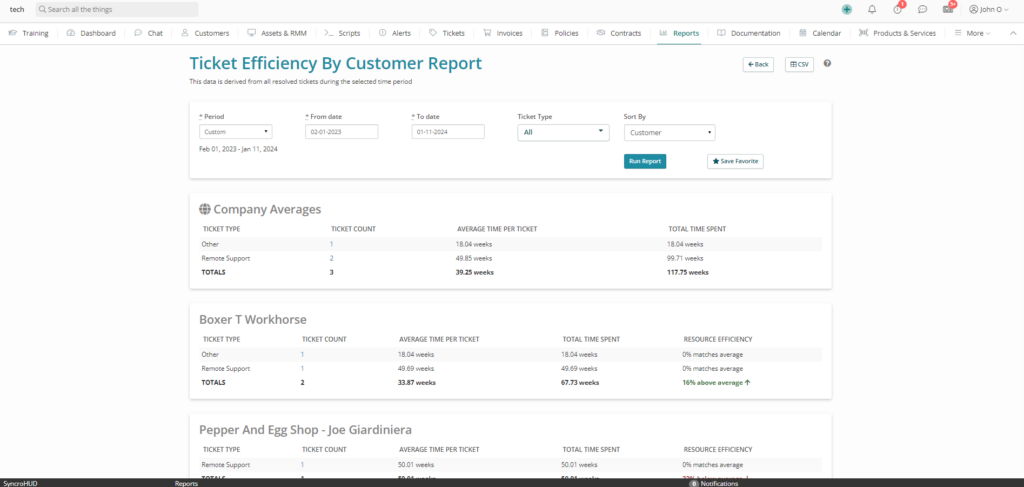
Overview: Syncro is a cloud-based IT management platform that combines ticketing with broader operational tooling such as asset management, remote support, and reporting. While Syncro is often associated with service providers, internal IT departments can also use the platform to centralize ticket handling, device management, and technician workflows in a single system.
For IT teams looking to consolidate multiple tools into one platform—particularly where ticketing, endpoint management, and operational reporting intersect—Syncro can provide a more unified experience than a standalone ticketing tool. The platform is generally well-suited for small to mid-sized IT teams that value simplicity and fast setup.
Key features:
- Ticket and service request management
- Workflow automation
- Integrated asset and endpoint management
- Reporting and analytics
- Customer/self-service portal
- Multi-channel ticket intake
- Integrations with third-party tools
- Mobile app
2. ConnectWise PSA (formerly ConnectWise Manage)
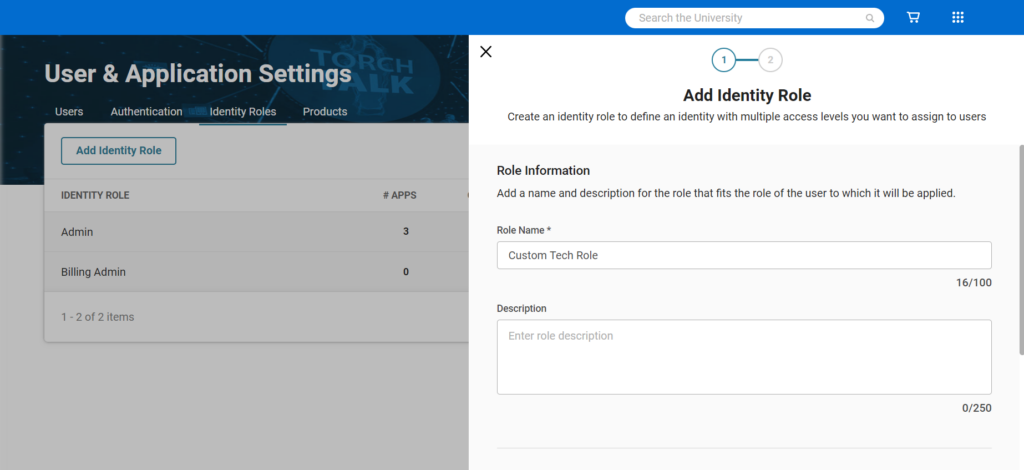
Overview: ConnectWise PSA is a cloud-based professional services automation (PSA) and service management platform that includes comprehensive ticketing and service desk capabilities. While the platform is widely used by managed service providers, many internal IT teams also use ConnectWise PSA to manage service requests, incidents, changes, and service delivery workflows across complex IT environments.
The platform supports advanced ticket routing, time tracking, SLA management, and reporting. Its depth of functionality can be an advantage for larger IT departments with mature ITSM processes, but smaller or less process-heavy teams may find the platform more complex to implement and administer.
Key features:
- Ticket and service request management
- Automation and workflow rules
- SLA tracking and reporting
- Time and activity tracking
- Multi-channel intake (email, portal, etc.)
- Integrations with monitoring, asset, and business systems
- Mobile app
3. Faveo Help Desk
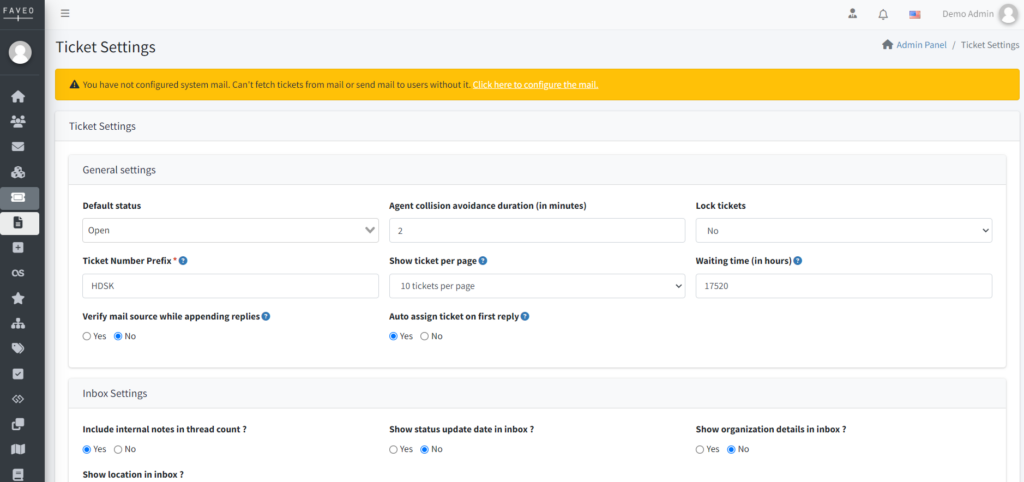
Overview: Faveo is a flexible IT ticketing and service desk platform available in both cloud-hosted and on-premises deployment models, making it appealing for organizations with strict data residency or compliance requirements. The platform provides core ticketing features for handling incidents and service requests, along with tools for workflow customization and automation.
Faveo also places an emphasis on IT service management practices, with support for problem management, change management, asset tracking, and CMDB-style functionality. This makes it a viable option for IT departments looking to move toward more formalized ITSM processes without adopting an enterprise-scale platform.
Key features:
- Ticket management
- Automation and workflow creation
- Reporting and dashboards
- Custom fields and forms
- Multi-channel support (email, portal, chat)
- Customer/self-service portal
- Asset and configuration tracking
- Mobile access
4. Freshdesk
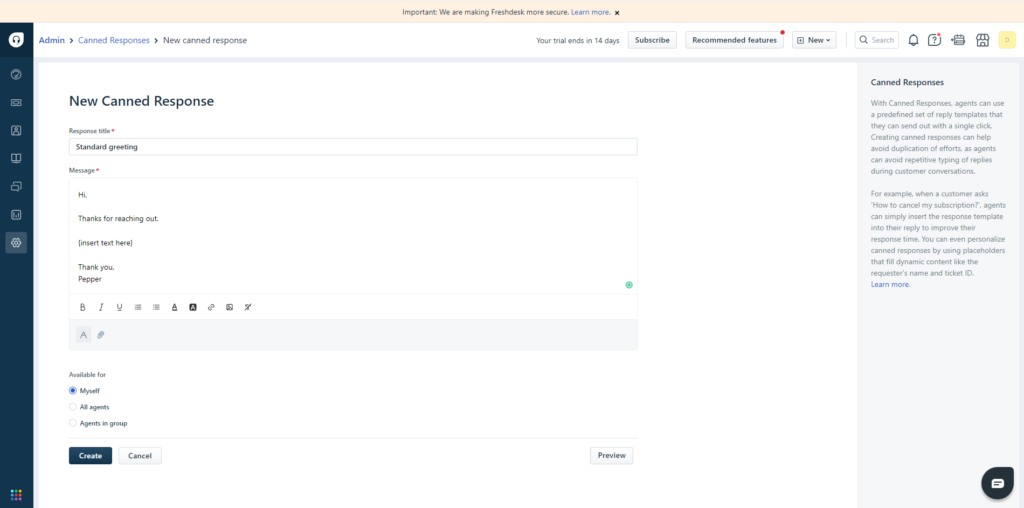
Overview: Freshdesk is a cloud-based help desk and ticketing system known for being easy to deploy and intuitive for both IT agents and end users. While Freshdesk is commonly used for customer support, many internal IT teams adopt it as a lightweight IT service desk for handling incidents, service requests, and internal support workflows.
The platform supports automation, SLA policies, knowledge base management, and multi-channel ticket intake. Freshdesk has also introduced AI-powered features in recent years to assist with ticket triage, suggested responses, and agent productivity, making it a strong choice for IT teams looking to improve efficiency without heavy configuration overhead.
Key features:
- Ticket and request management
- Automation and SLA policies
- Reporting and analytics
- Workflow rules
- Multi-channel support (email, portal, chat)
- Knowledge base and self-service portal
- Integrations with collaboration and monitoring tools
- Mobile app
5. KIX

Overview: KIX is an open-source-based service management platform that can be deployed on-premises or consumed as a cloud service. It offers a modular approach, allowing IT teams to start with core ticketing functionality and add capabilities such as asset management, workflows, and Kanban-style task management as needed.
KIX is particularly appealing to IT departments that want greater control over their service desk environment or prefer open-source foundations. The platform supports ITSM-aligned workflows and can be customized to match internal processes, though it may require more technical effort to deploy and maintain compared to fully managed SaaS tools.
Key features:
- Ticket management
- Workflow automation
- Reporting and dashboards
- Modular add-ons (e.g., asset and inventory management)
- Integrations with third-party systems
- Mobile access
- On-premises and cloud deployment options
6. SysAid
Overview: SysAid is a mature IT service management platform designed specifically for internal IT departments. It supports incident management, service requests, asset management, change workflows, and self-service, making it well-suited for organizations looking to formalize ITSM practices.
SysAid emphasizes automation and self-service to reduce ticket volume and improve resolution times. IT teams can use built-in workflows to route requests, enforce SLAs, and guide technicians through standardized resolution processes. SysAid is available in both cloud and on-premises deployment models.
Key features:
- Ticket and request management
- Workflow automation
- SLA tracking and reporting
- Asset and configuration management
- Self-service portal and knowledge base
- Integrations with remote support and monitoring tools
- Mobile app
7. SolarWinds Web Help Desk
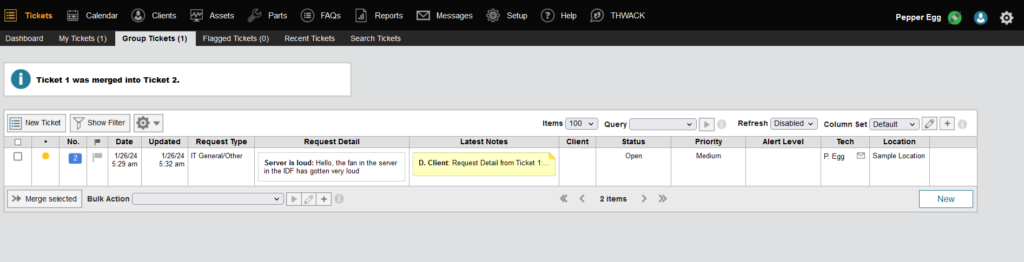
Overview: SolarWinds Web Help Desk (WHD) is an on-premises IT ticketing system designed for organizations that prefer to manage their service desk infrastructure in-house. It provides core help desk capabilities such as incident tracking, request fulfillment, SLA enforcement, and reporting.
In addition to ticketing, WHD includes asset management and inventory tracking features, enabling IT teams to associate devices and users with support requests. While SolarWinds also offers a separate cloud-based service desk product, Web Help Desk remains a popular choice for IT departments with on-prem requirements or highly controlled environments.
Key features:
- Ticket lifecycle management
- SLA policies and reporting
- Automation and routing rules
- Asset and inventory management
- Multi-channel ticket intake
- User satisfaction surveys
8. Zendesk
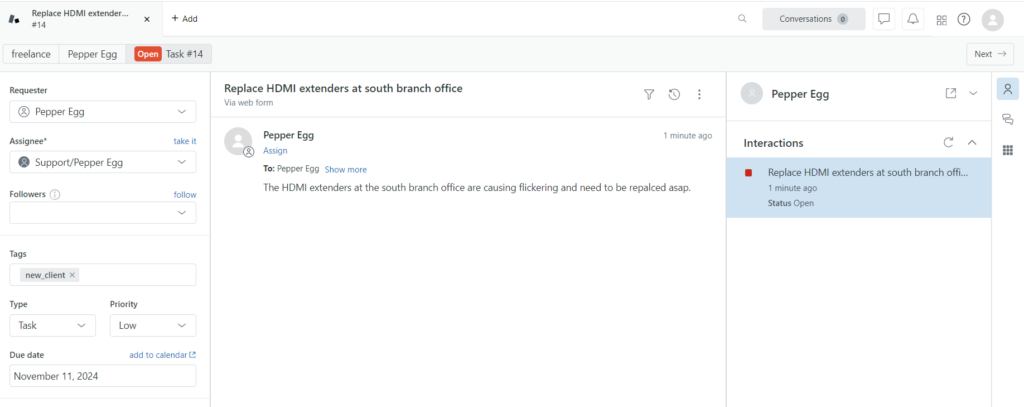
Overview: Zendesk is a widely adopted cloud-based service desk platform used across IT, customer support, and shared services teams. For internal IT departments, Zendesk provides a flexible ticketing system that supports incident management, service requests, automation, and reporting at scale.
While Zendesk is not purpose-built exclusively for ITSM, it can be configured to support IT workflows such as SLAs, escalations, approvals, and internal knowledge bases. Organizations with multiple support teams (e.g., IT, HR, Facilities) often use Zendesk as a centralized service desk platform.
Key features:
- Ticket and request management
- Automation and workflow rules
- Reporting and analytics
- Multi-channel support (email, portal, chat)
- Self-service portal and knowledge base
- Extensive third-party integrations
- Mobile app
9. Zoho Desk
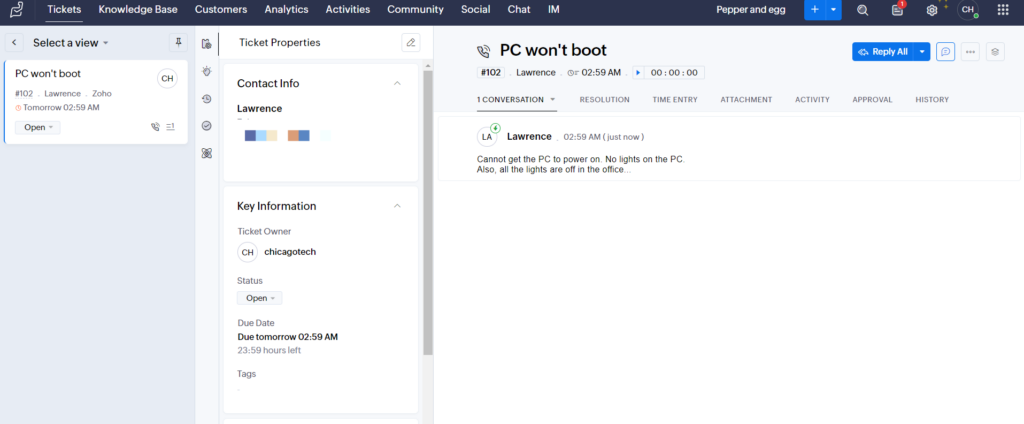
Overview: Zoho Desk is a cloud-based help desk platform focused on usability and fast deployment. For IT departments, Zoho Desk provides ticketing, SLA management, automation, and reporting features that can support everyday service desk operations without extensive configuration.
Zoho Desk integrates tightly with the broader Zoho ecosystem and offers a marketplace of integrations for connecting with monitoring tools, collaboration platforms, and asset systems. This makes it a strong option for IT teams that already use Zoho products or want a cost-effective, scalable service desk solution.
Key features:
- Ticket and service request management
- Automation and workflow rules
- SLA management and escalations
- Reporting and dashboards
- Multi-channel ticket intake
- Self-service portal and knowledge base
- Third-party integrations
- Mobile app
Frequently Asked Questions About IT Ticketing Systems
IT ticketing software is a system used to capture, route, prioritize, and track service requests and incidents within an organization. In addition to basic issue tracking, modern ticketing platforms centralize communication between users and IT teams, maintain historical context for recurring problems, and create a single source of truth for service activity. This improves accountability, reporting accuracy, and service consistency across the organization.
Automation reduces manual triage, improves SLA adherence, and ensures consistent escalation and prioritization workflows. By automating repetitive actions such as routing, prioritization, and notifications, IT teams can reduce response times and minimize human error. Automation also allows technicians to focus on higher-value work instead of administrative tasks, improving both operational efficiency and technician satisfaction.
Ticketing systems enable structured incident, problem, and change management workflows aligned with ITIL best practices. They provide standardized processes for intake, categorization, escalation, and resolution, helping IT teams operate in a more predictable and auditable way. Over time, this structure supports continuous improvement by making it easier to analyze trends, identify root causes, and optimize service delivery processes.
Essential features include lifecycle management, automation, SLA tracking, multi-channel intake, reporting, and integration capabilities. In addition, organizations should consider usability for both technicians and end users, self-service and knowledge base functionality, and support for role-based permissions. The right feature set helps ensure the platform fits operational workflows today while remaining flexible enough to scale as IT service demands grow.
Syncro enables policy-based automation, AI-assisted classification, and customizable workflows that ensure tickets are routed, prioritized, and escalated consistently across distributed environments. By standardizing how requests enter the system and how they move through resolution stages, IT departments can reduce variability in service delivery. This consistency improves SLA compliance, reporting accuracy, and overall service reliability across teams and locations.
Yes. Syncro connects ticket workflows with endpoint visibility and monitoring data, helping IT departments resolve issues with full system context while maintaining centralized operational control. When tickets are linked to devices, users, and alerts, technicians can troubleshoot faster and make more informed decisions. This tighter integration reduces context switching and shortens mean time to resolution for common endpoint-related issues.
Structured ticket workflows strengthen accountability, documentation, and response consistency — all critical components of secure IT management. Ticketing systems create an auditable record of incidents, changes, and service actions, which supports compliance and internal governance requirements. Clear workflows also help enforce security policies by ensuring sensitive issues follow approved escalation paths and resolution procedures.

Share
Related Resources