
Secure Identity Management for Every User
Identity is your first line of defense. Syncro lets you easily set up new hires, reset passwords, lock down access, and more — all without jumping between different portals.


Rapid Account Response
Take immediate action on risky or locked accounts with password resets, MFA resets, and session controls.

Automated Directory Sync
Ensure your user base stays aligned with your organizational structure by natively syncing Entra ID profiles.

Subscription Spend Visibility
Track license usage to eliminate dormant or unused seats and ensure you aren’t overspending on software.
More Power. Fewer Clicks.
Syncro puts the most essential Microsoft 365 and Entra ID user actions right where your team works every day.
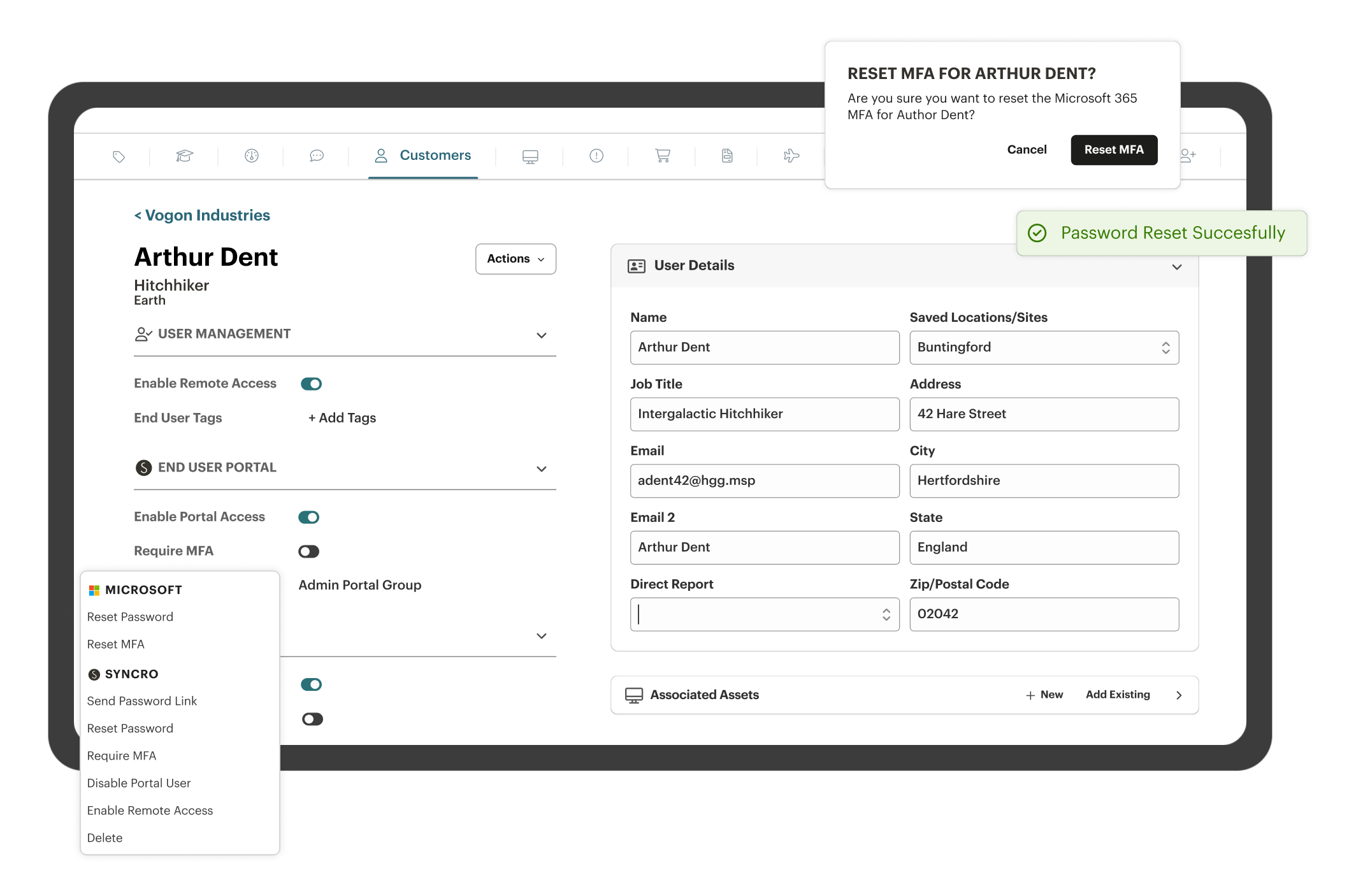
Keep Users in Sync Automatically
User info updates from Entra ID on its own. New users appear automatically, and removed users are marked as disabled so records stay accurate.
Instant Resets
Reset passwords and enforce MFA directly within Syncro, saving time and eliminating the need for additional logins.
Identity Baseline Protection
Assess security posture automatically through industry standard baselines to keep your tenants secure and manage drift through automated notifications.
Identity Restore (Add-On)
Recover Entra ID users, groups, and settings quickly to undo mistakes or respond to incidents with confidence.

Harden Identity Governance
Bridge the gap between hardware and cloud identity. Deactivate stale accounts and revoke Microsoft 365 sessions with one click, ensuring security and visibility across the entire employee lifecycle.

Consolidate Your Admin Core
End portal shuffling by managing Entra ID directly from Syncro. Perform password and MFA resets and license assignments with simple actions that sync across your ecosystem instantly.

Accelerate Service Delivery
Syncro brings user management into your support workflow, so technicians can resolve identity tickets in seconds. Minimize employee downtime and boost your department’s resolution speeds.
Harden Identity Governance
Bridge the gap between hardware and cloud identity. Deactivate stale accounts and revoke Microsoft 365 sessions with one click, ensuring security and visibility across the entire employee lifecycle.
Consolidate Your Admin Core
End portal shuffling by managing Entra ID directly from Syncro. Perform password and MFA resets and license assignments with simple actions that sync across your ecosystem instantly.
Accelerate Service Delivery
Syncro brings user management into your support workflow, so technicians can resolve identity tickets in seconds. Minimize employee downtime and boost your department’s resolution speeds.

“What impressed us most is Syncro’s deep Microsoft 365 integration; their security and management capabilities have become central to our operations.”
— Brandon J., President

Entra ID Protection for MSPs: Automate Identity Security
Learn how Entra ID Protection strengthens identity security through risk-based authentication, automated access controls & scalable zero-trust implementation.

Entra Conditional Access Explained: Policies, Features & Benefits
Learn what Entra Conditional Access is: how it works, key features & benefits. See how adaptive access policies improve identity security in hybrid work.

Microsoft 365 Security: Essential Guide for MSPs and IT Teams
Struggling to lock down Microsoft 365? Discover how IT departments can deploy airtight security, automate compliance, and respond fast – at scale.
Frequently Asked Questions
Syncro uses a secure API connection to your Microsoft tenant. It automatically pulls in your user list and licenses, keeping them in sync so your help desk always has the latest data.
Yes. You can reset passwords and MFA settings for any user in your synchronized directory, regardless of whether they are on-site or working remotely.
Definitely. Syncro provides a clear view of assigned vs. unassigned licenses, making it easy to spot and revoke unused subscriptions that are inflating your monthly Microsoft bill.
Yes. Syncro’s multi-tenant architecture is perfect for IT teams managing multiple business units or organizational branches under different Microsoft accounts.
With Syncro, you can disable users and revoke their active sign-in sessions in just a few clicks, ensuring the organization’s data remains secure the moment a staff member leaves.

Start Your Free Trial with Syncro Today
Gain instant access. Go live in just a few clicks and master core features with guided onboarding. No heavy setup required.

Start Your Free Trial with Syncro Today
Gain instant access. Go live in just a few clicks and master core features with guided onboarding. No heavy setup required.